Managing Third-Party Notices Data for a Group
Code Insight 6.14.2 SP2
The use of third-party (TP) and open source software (OSS) is permitted under various open source licenses. In many cases, open source licenses carry with them an obligation that the user of the open source software must provide attribution to the original author. This obligation is generally met by generating a report that includes a list of open source and third-party materials and the licenses under which they are used for the shipping product or application.
Code Insight provides a standard third-party notices feature in the product to make this a simple byproduct of the auditing work performed in the product. The following fields comprise a third-party notice for the use of a particular piece of TP/OSS:
|
Field Name |
Field Description |
|
Include in Third-Party Notices |
Used to control which audit findings are included in the Third-Party Notices report. |
|
Notice Title |
Recommended: Component Version (License) Example: Apache Ant 4.7.1 (Apache License, Version 2.0) |
|
Notice URL |
Hyperlink to desired location. Typically, this is to the project homepage. |
|
Notice Attribution Statements |
Aggregated list of attribution statements and other notices as-found in the codebase. |
|
Notice Copyright Statements |
Aggregated list of “clear” copyright statements as-found in the codebase. May optionally paste in copyright statement from the license text. |
|
Notice License URL |
Hyperlink to desired location. Typically, this is to the location of the license text. |
|
Notice License Text |
The license text as it is to be shown in the Third-Party Notices report. |
|
Source Distribution URL |
Location where the source materials are available for a given third- party or open source software item if you are making this available. |
The information entered in the third-party notice fields is used to produce an out-of-the-box third-party notices report (from the Web UI).
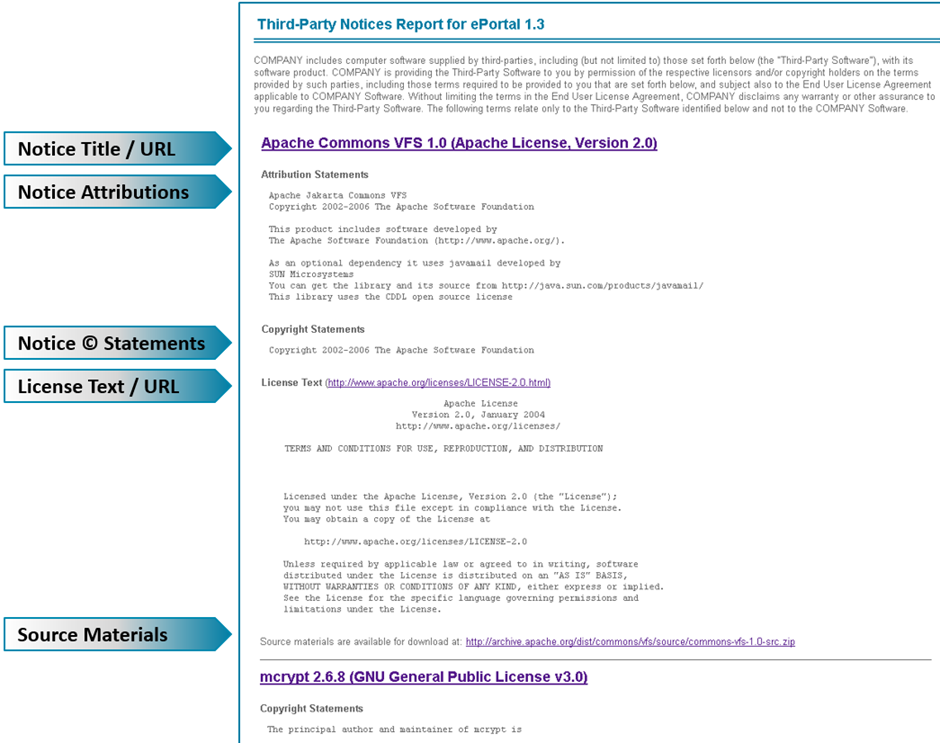
The report contains a block for each item that has been flagged to be included in the report consisting of the following values:
| • | Notice Title and optional Notice URL. |
| • | An optional Notice Attribution section if the corresponding field has a value. |
| • | An optional Notice Copyright section if the corresponding field has a value. |
| • | An optional License Text and URL section if the corresponding fields have values. |
| • | An optional Source Materials URL if the corresponding field has a value. |
Third-party notice fields are located on the Notices tab of the Group Details window in Detector.
A third-party notice can either be defined from scratch for the current group or loaded (using the Load Standard Notice Data button) from the Standard Notices data (if available) and modified as needed. A standard notice applies if the component, version, and license of the notice matches that of the current group. If a standard notice is loaded, it can be modified and saved (using the Save as Standard Notice Data button) as an updated version of the standard notice, or just used for the current group.
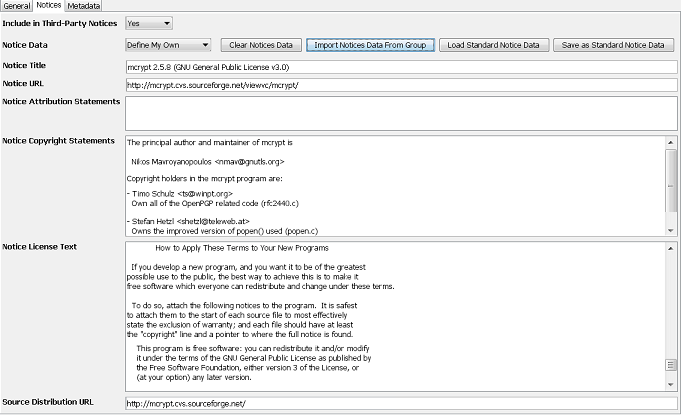
The Import Notices Data From Group button may be used to copy data from the General Tab to the Notices Detail tab to avoid unnecessary rework if the information has already been entered.