When a New Model Definition Is Uploaded
When the model definition is uploaded to the license server, feature counts are placed into license pools. Counts are allocated to named license pools in the order that is specified in the model definition, starting with the topmost named license pool.
The following rules of access apply when allocating feature counts of the same name, but with different versions and expiry dates:
| 1. | Features that match the version specified in the model definition are allocated first. Features with longer expiry dates are allocated before features with a shorter expiry date. |
| 2. | If no features are available that match the version specified in the model definition, features of the next higher version are allocated. Features with longer expiry dates are allocated before features with a shorter expiry date. (Features of a lower version are not allocated.) |
Features With Future Start Date
Features holding a start date in the future will not be allocated to named license pools but will remain in the default license pool. A feature with a future start date will stay in the default license pool even beyond its start date until the model definition is reapplied to the license server.
Grouping of Features in License Pools
When the available number of counts has been distributed, any named license pool for which insufficient counts are available will remain empty or will only be partially filled.
When the model definition on the license server changes, any counts that are currently in use by clients are recorded as used against the named license pool the counts originate from. If a named license pool is deleted, it stays active until all used counts have been returned to it. Only after that is the named license pool removed. This enables the license administrator to maintain an overview of all used feature counts.
As a result of this behavior, license pools can be under-allocated or over-allocated.
The following example illustrates how under- or over-allocation can occur:
| 1. | The model definition allocates 8 counts each of features f1 and f2 to the named license pool P1. |
| 2. | Users check out 6 counts of feature f2: |
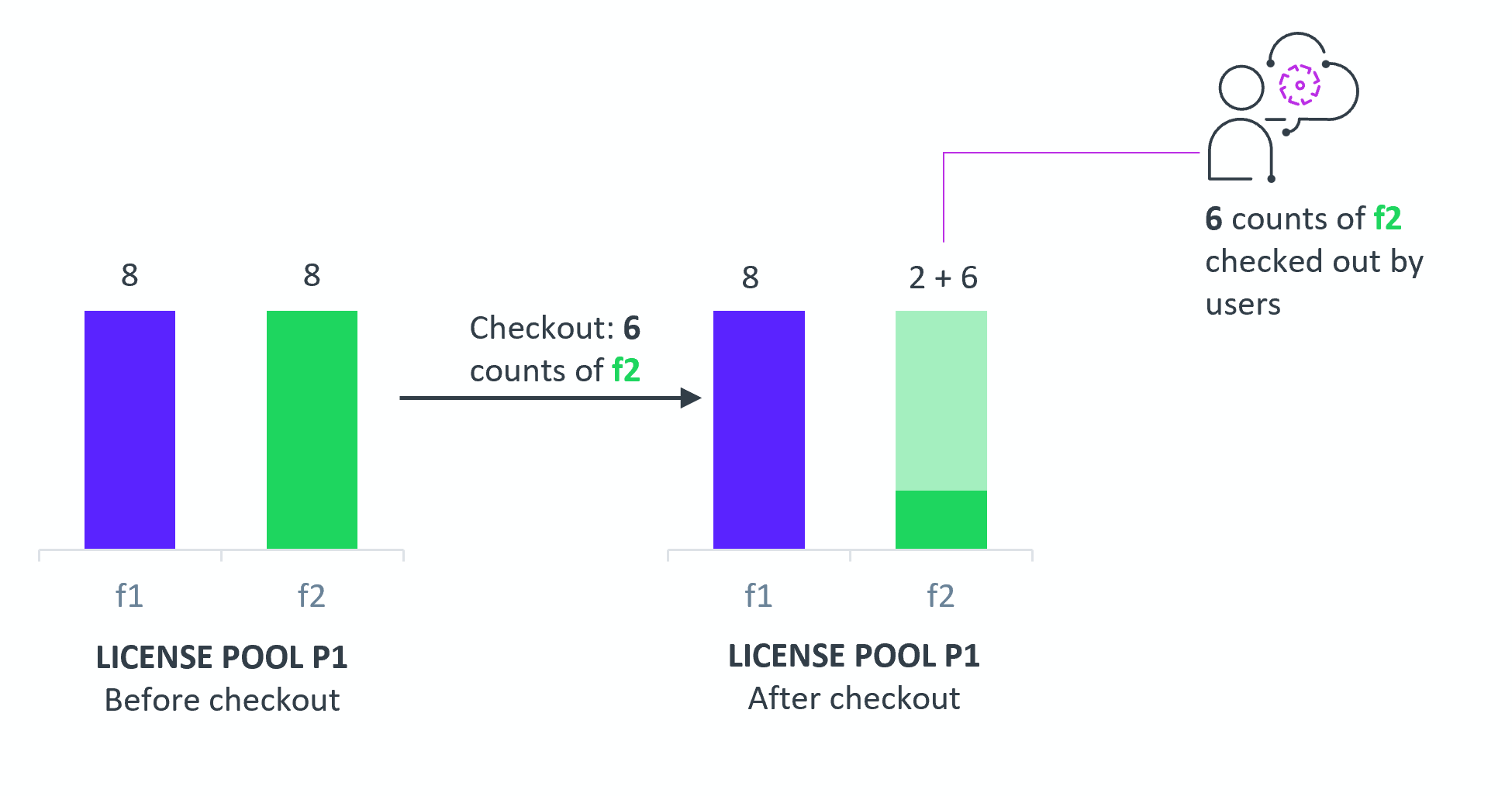
Diagram showing the license count allocation of f1 and f2 to named license pool P1, and users subsequently checking out counts of f2.
| 3. | An updated model definition is posted, which moves all 8 counts of f2 to another license pool P2. |
| 4. | The following diagram shows the allocation as specified by the updated model, and the actual allocation: |
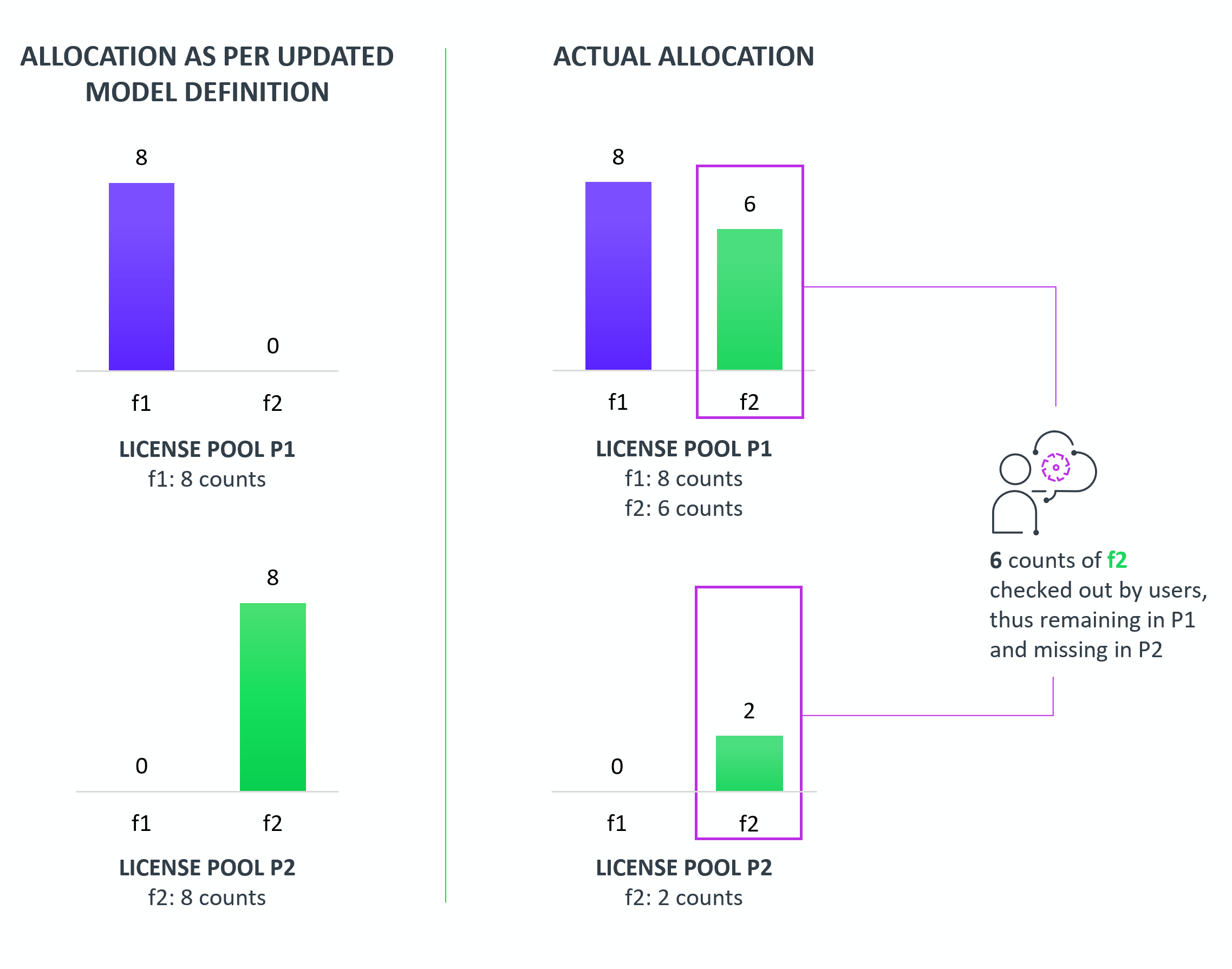
Diagram showing the license count allocation after the model update while counts were in use.
Note that the actual allocation of counts differs from that specified in the model, due to 6 counts being in use when the model was updated:
| • | P1 should have 0 counts of f2, but retains the 6 counts that are in use. The feature slice of f1 in P1 is therefore OVER-ALLOCATED. |
| • | P2 should have 8 counts of f2, but receives only 2 counts. The feature slice of f1 in P1 is therefore UNDER-ALLOCATED. |
When the 6 used counts in P1 expire or are returned, the license pools are recomputed according to the new model. All 6 counts are moved from P1 to P2 as per the model definition, and the feature slices for f1 in P1 and P2 return to a NORMAL status.
Optimization Logic For Model Definition Changes
When the model definition changes, any named license pools that are already fully satisfied are skipped when feature counts are placed into named license pools. As a result, it is possible that existing features in fully satisfied named license pools are not replaced with newly available features that have a longer expiry date. Instead, these newly available features are placed into lower-ranked named license pools (provided that these are not fully satisfied) or the default license pool.
To ensure that higher-ranking named license pools receive features with longer expiry dates, it is recommended that you delete and re-upload the model definition. This forces a redistribution of feature counts across all license pools, regardless of the current allocation of feature counts.
License Server Lock During Model Updates
When a new model definition is uploaded, the server is locked until the model repost is completed. When it is locked, the server will not accept:
| • | Additional model reposts. The server returns error 429. The response will look similar to this: |
Response: {
"key" : "glsErr.tooManyModelUpdateRequests",
"message" : "Model update in process, please retry after some time."
}
| • | Licensing requests (preview requests, access requests or signed access requests from the Cloud Monetization APIs, or capability requests). The server returns error 503. The response will look similar to this: |
HTTP Error 503. The service is unavailable.
The error includes a Retry-After header, instructing the client making the call to wait for a certain amount of time before retrying (the actual delay may vary depending on system configurations).
In both cases, wait until the server is unlocked before retrying.