Embedded Devices Enhancements in 2024.07
The following enhancement has been made for the management of Embedded Devices in the 2024.07 release.
Supporting Multiple Signature Strengths for Standalone Devices
With technology and computational power evolving rapidly, algorithms and key sizes that are considered secure today may be considered vulnerable in the future. Therefore, software producers may decide that they would like to migrate to a different signature strength.
To enable migration to a different signature strength, the Publisher Identity utility for FlexNet Embedded has been enhanced to allow producers to add one additional signature strength to the already existing signature strength. Existing clients in the field will continue to support the existing identity using the original signature strength, while new clients that have been built using the updated identity use the additional, higher signature strength to validate communication with the back office.
Note:Adding a signature strength is currently only supported for standalone devices.
Managing Signature Strengths
Publishers can add or delete a signature strength using the updated Publisher Identity utility either in UI or console mode.
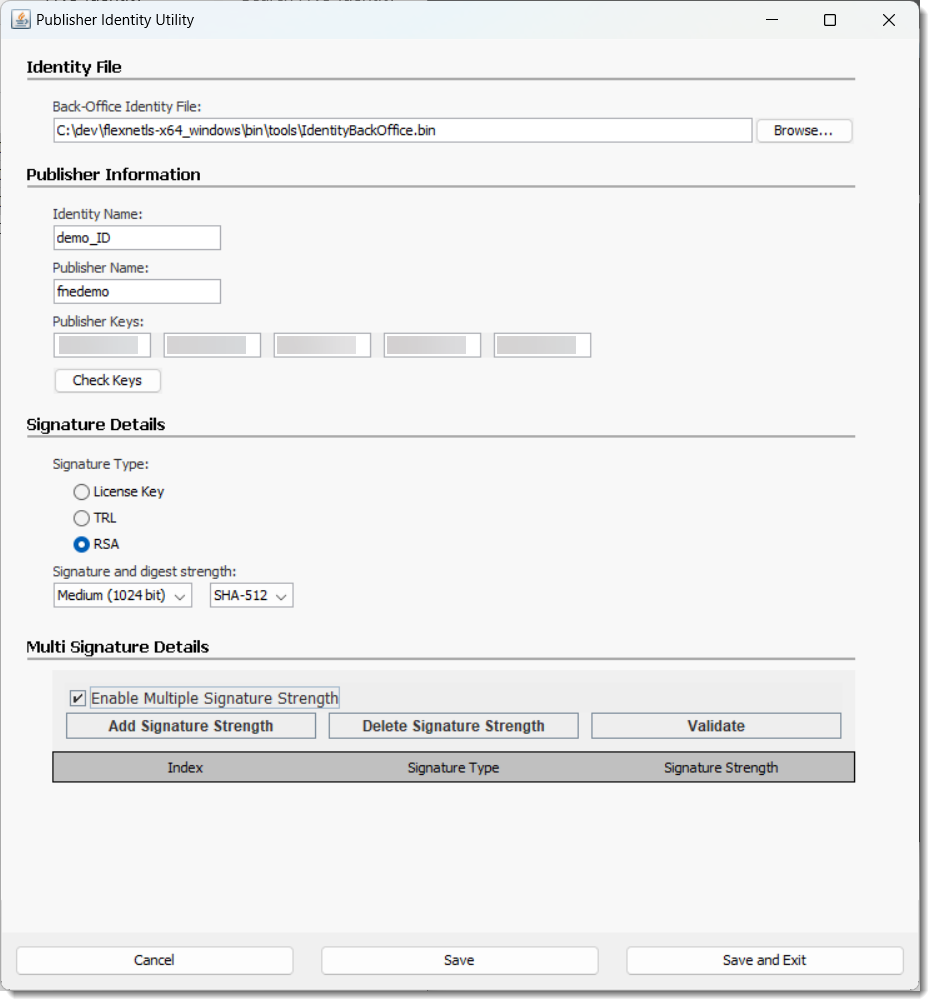
The Publisher Identity utility UI has been changed as follows:
| • | To create a new identity, publishers no longer need to specify different paths for the identity files (back office, server, and client identity). Instead, when they click Save or Save and Exit in the updated UI, they are prompted to specify a folder. Upon confirming the folder location, the Publisher Identity utility creates a subfolder with a file name in the format YYYY-MM-DDThh-mm-ss-sss (for example, 2024-06-12T09-30-24-064), which will hold the new set of identity files. |
| • | To add or delete a signature strength, publishers specify the existing back-office identity that they want to modify in the Identity File section. Clicking Enable Multiple Signature Strengths displays controls for adding, deleting or validating a signature strength. Again, clicking Save or Save and Exit prompts the publisher to specify a folder. This folder will hold a subfolder with a file name in the format YYYY-MM-DDThh-mm-ss-sss which will contain the updated set of identity files. |
The following screenshot shows the updated Publisher Identity utility UI:
The following new commands have been introduced to add or delete a signature strength in console mode:
pubidutil -silent [-backOffice backofficeidfile.bin] [-addSignatureStrength sig-type
sig-strength]
pubidutil -silent [-backOffice backofficeidfile.bin] [-delSignatureStrength sig-type
sig-strength]
For detailed information about adding or deleting a signature strength using the UI or the command-line, refer to the FlexNet Embedded documentation.
Client Behavior for Validating Messages
When an additional signature strength is added to an identity, existing clients will continue to validate any downstream messages, such as capability responses, using the original signature strength. Any new clients that are built using the updated identity will validate downstream messages using the added signature strength.
The following diagrams visualize the behavior.
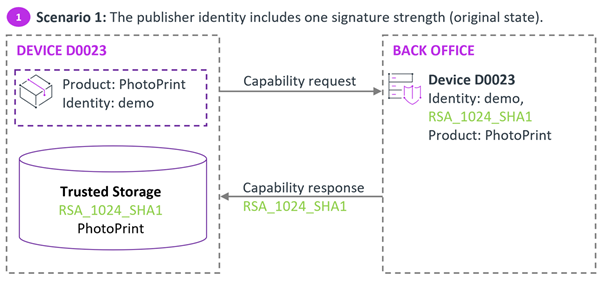
Initial scenario where the identity used for the client software and in the back office has only one signature strength.
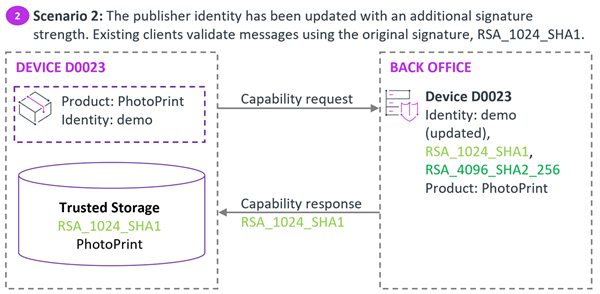
In scenario 2, the publisher identity in the back office has an additional signature strength. Existing devices running the client software that was built using the original, unchanged identity use the original signature strength to validate downstream messages.
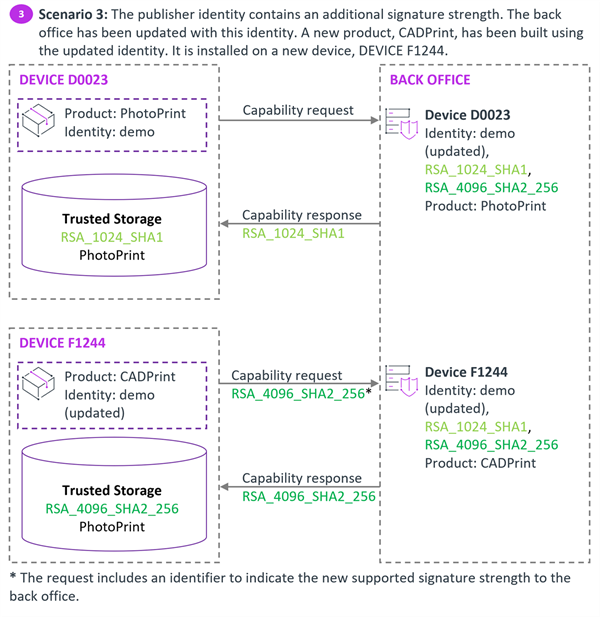
In scenario 3, the publisher has launched a new product which was built using the identity that includes the additional signature strength. This client will always use the added, higher signature strength to validate downstream messages.
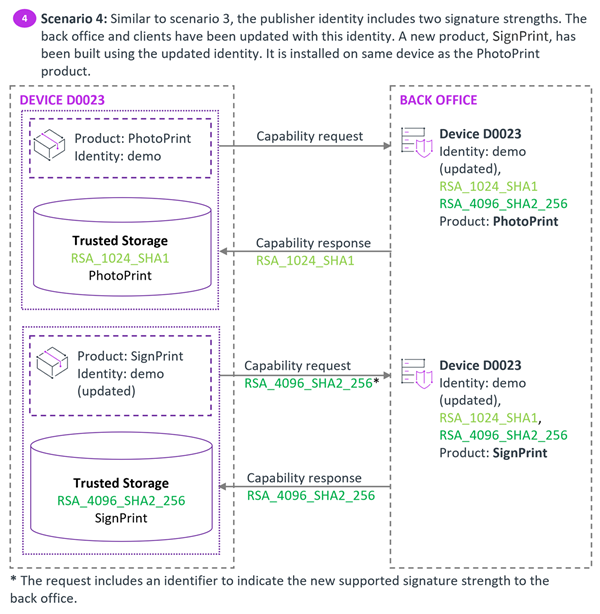
In scenario 4, the publisher has launched another new product which has also been built using the updated identity. It is installed on the same device as the PhotoPrint product. However, both clients use their own trusted storage. PhotoPrint will use the original signature strength, while SignPrint will use the higher signature strength to validate downstream messages.