Entitlement Management Enhancements in 2025.12
The following enhancements to entitlement management were added in the 2025.12 release.
| • | Entitlement Status Change Propagates to All Associated Line Items and CLS |
| • | New Option to Select License Email Template Variations for FlexNet Publisher Licenses |
| • | Copy Order ID in Bulk Upgrade Operations |
| • | Setting a Default Distribution Tier Type for Entitlement Creation |
Entitlement Status Change Propagates to All Associated Line Items and CLS
(SWM-29203)
This enhancement introduces the ability for producers to seamlessly toggle the status of an entitlement between Active and Inactive within FlexNet Operations. Building on existing line item-level functionality, this feature extends license control to the entitlement level, simplifying bulk license management and renewal workflows.
When a producer deactivates an entitlement, all associated line items—including maintenance line items—automatically transition to an Inactive state. The entitlement and its associated features will be set to a non-deployed status in Cloud Licensing Service (CLS), ensuring that no licenses are served.
Implementation Notes
The functionality is controlled by the configuration option License server features will become inactive when the entitlement or line item state is changed to Inactive (under System > Configure > FlexNet Operations > General Options).
This option can only be enabled both the following configuration options are unselected:
| • | Remove licenses from CLS when the line item state changes to Inactive/Obsolete |
| • | Allow used entitlement/line item state change to Inactive or Obsolete |
Note:This enhancement does not include data template-based entitlement updates.
New Option to Select License Email Template Variations for FlexNet Publisher Licenses
(Cases 02448267, 02461390; SWM-19918)
Previously, when emailing a FlexNet Publisher license to a customer, producers had the following options:
| • | use the DEFAULT variation of the License Email template from the Send License File Via Email page (available by selecting a fulfillment on the Support Licenses and Maintenance page and clicking Email License) |
| • | add a license template when creating a license technology on the Create a License Technology page (under Administer > License Technologies > Add a License Technology). |
To provide more flexibility in selecting a License Email template, we added a new dropdown menu License Email Template variation to the Send License File Via Email page. This enables producers to choose any available License Email template variation from the list when sending a FlexNet Publisher license.
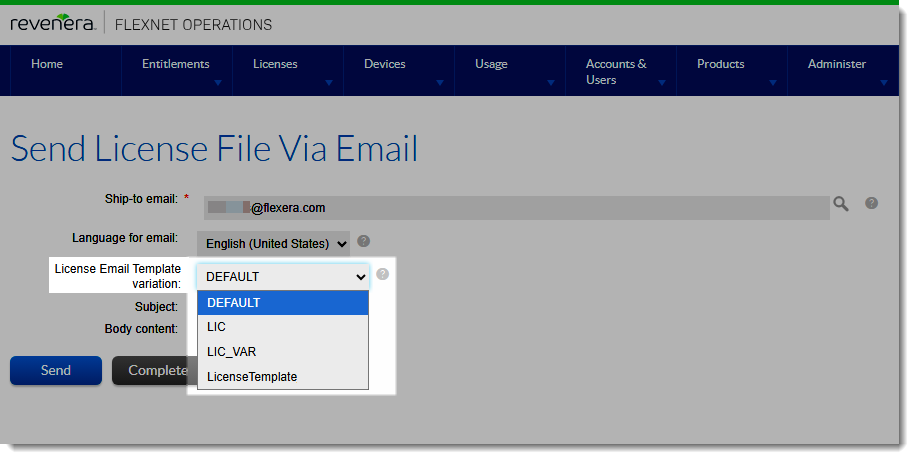
For FlexNet Publisher licenses, producers can select the License Email template from the License Email Template variation dropdown menu on the Send License File Via Email page.
This enhancement provides greater control and customisation, ensuring the right template is used for each customer communication.
Copy Order ID in Bulk Upgrade Operations
(Case 02795165, 02984932; SWM-20010)
FlexNet Operations now supports copying the order ID from the parent entitlement line item to the upgraded line item during Bulk Upgrade operations.
Previously, users could manually set the order ID when creating an entitlement line item. However, during upgrades, the order ID was not automatically carried over to the target line item.
Tip:This enhancement builds on the functionality introduced in the 2022.12 release, where custom attributes could be copied during upgrades (see Ability in Bulk Upgrade Wizard to Copy Custom Attributes in the FlexNet Operations 2022 ALM Release Notes).
Implementation Notes
In upgrade scenarios (for example, when Product04 is upgraded to Product05), users can now choose to copy the order ID from the original entitlement line to the upgraded one.
During the upgrade operation, selecting Yes for the new Copy Order ID? option (on the Entitle Customer To Licenses | Bulk Upgrade - Line Item Attributes page) will trigger the system to carry over the order ID.
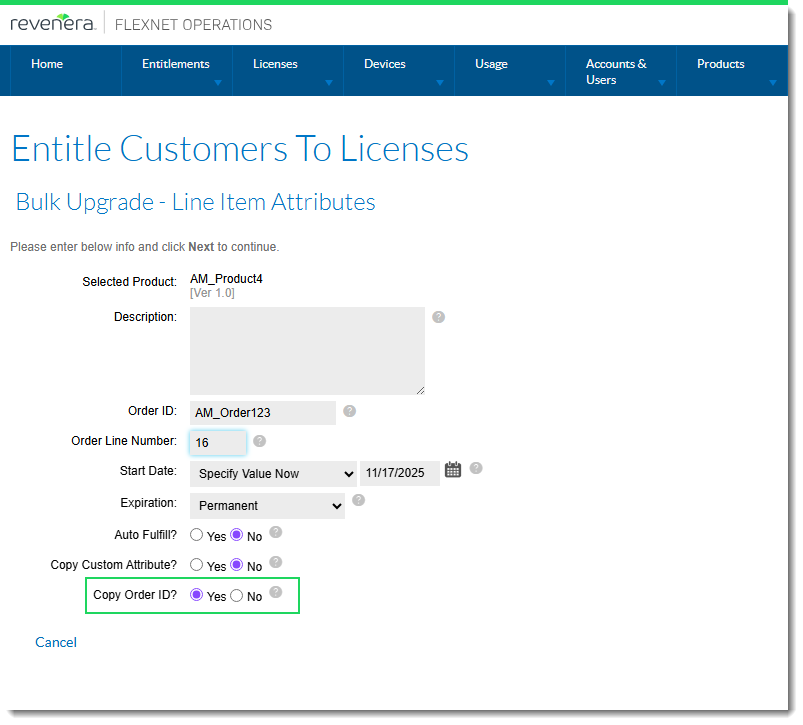
The new Copy Order ID? option on the Entitle Customer To Licenses | Bulk Upgrade - Line Item Attributes page.
To verify the that the order ID has been applied to the upgraded line item, navigate to the List Entitlements by Order section, where the upgraded line item will display the same order ID as its parent.
Additionally, when editing the upgraded entitlement, the retained Order ID is clearly visible, confirming successful copying.
Setting a Default Distribution Tier Type for Entitlement Creation
(Cases 03569865, 03569975; SWM-28314)
This enhancement introduces a new configuration option Default Operator Used for default Distribution Tier Type (under System > Configure > FlexNet Operations > General Options) that allows producers to set a default value for the distribution tier type when creating entitlements.
Once configured, the Distribution Tier Type dropdown menu in the End Customer And Channel Partners dialog (displayed when adding line items to an entitlement) is automatically populated with the pre-set value.
Previously, the Distribution Tier Type order was randomly set when additional partner tiers were added, requiring manual selection during entitlement creation. Producers with multiple partner tiers had to manually select the correct tier (for example, Distributor) during entitlement creation, as shown in the following screenshot:
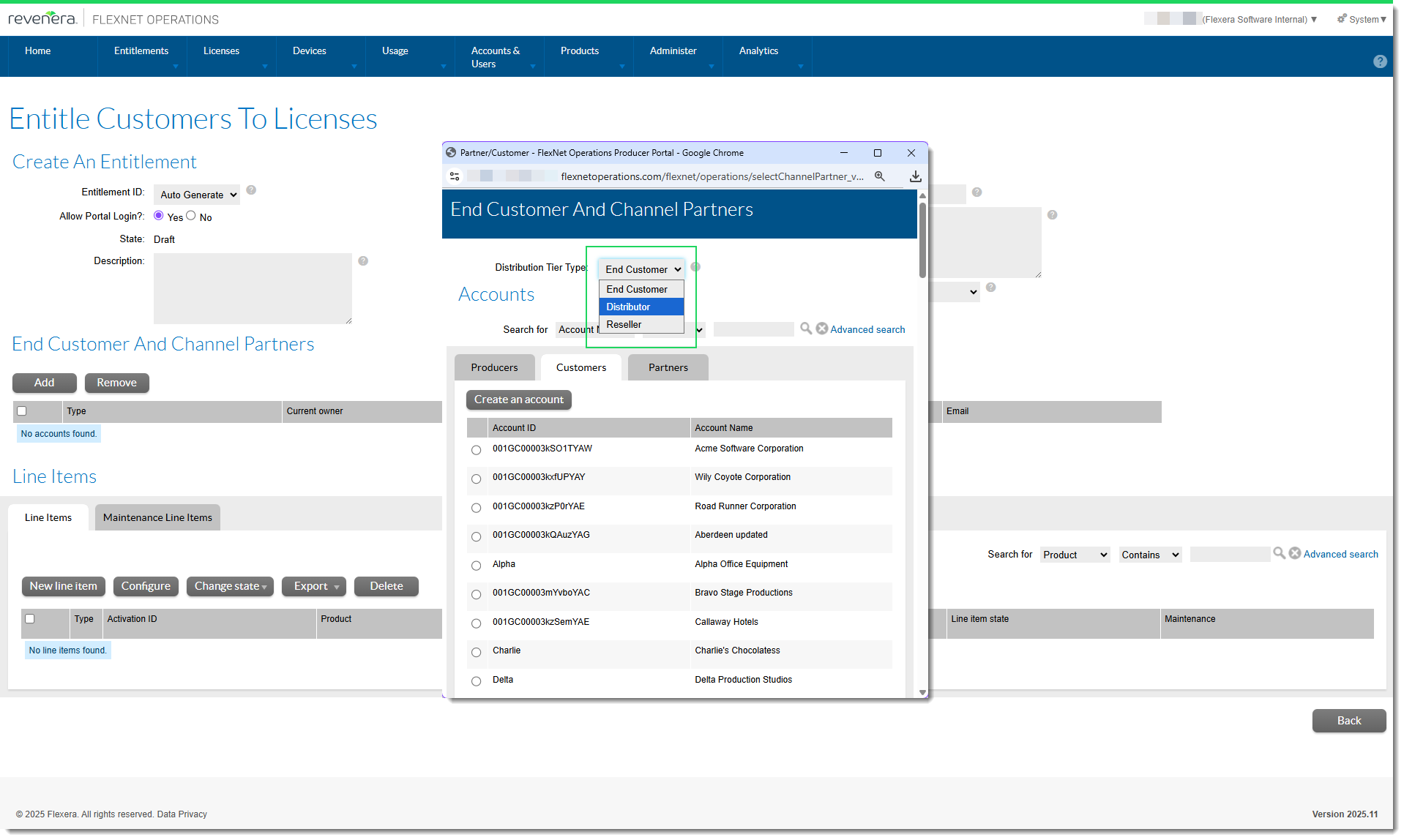
The Distribution Tier Type dropdown menu will be automatically populated if the option Default Operator Used for default Distribution Tier Type is configured.
Missing this step often led to errors and additional corrective actions.
For producers who frequently use a certain distribution tier as the initial partner tier, this enhancement simplifies entitlement creation and improves accuracy, reducing operational overhead.