User Experience Issues Resolved in 2025.05
The following issue related to user experience was addressed in the 2025.05 release.
| • | System Roles No Longer Visible in Portals |
| • | Resolved Issue of Incorrectly Formatted Page in End-User Portal |
System Roles No Longer Visible in Portals
(Cases 03009399, 03009414, 3011796; SWM-26277)
The system roles Default Producer Role and Manage Impersonated Access Tokens PP, and Default Portal Role and Manage Impersonated Access Tokens EP are no longer visible in the Producer Portal and the End-User Portal, respectively.
These roles are not intended for selection by producers or end users. To avoid that they are mistakenly assigned they are now hidden from the Producer Portal and End-User Portal.
Note:The roles Manage Impersonated Access Tokens PP and Manage Impersonated Access Tokens EP contain permissions for issuing so-called impersonated access tokens, which are a means to securely authorize SOAP and REST web service calls to FlexNet Operations. While the term “impersonated” might sound concerning, it simply refers to a mechanism where a privileged user can securely act on behalf of another user with limited permissions.
Resolved Issue of Incorrectly Formatted Page in End-User Portal
(Case 02411062, SWM-26279)
In the End-User Portal, when associating an existing user to an account, the page for selecting users was not correctly formatted.
The issue could be seen by following these steps:
| 1. | Click Accounts & Users > List Accounts. |
| 2. | On the Accounts page, click a hyperlinked account ID. |
| 3. | In the Account Users section, click Actions > Link existing users. |
| 4. | Click the pagination arrow to see the next set of users. |
| 5. | You will see the page with formatting issues: |
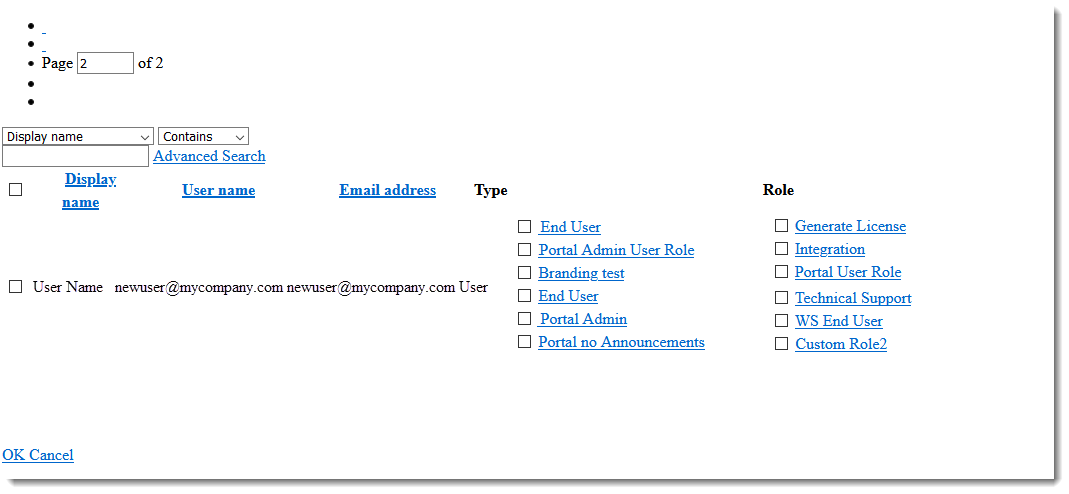
This issue no longer occurs.