Account and User Management Issues Resolved
The following issue involving the management of accounts was resolved in the 2025 R1 release.
| • | Users With Expired Accounts No Longer Fail to Update |
| • | Partners Can Now Filter Devices by Account Name and ID in End-User Portal |
Users With Expired Accounts No Longer Fail to Update
(Case 02917771, SWM-24640)
In previous releases, when an account was linked to a user whose association with a different account had expired, the account could not be updated. When attempting to update such an account, FlexNet Operations returned an error message. The following example illustrates the scenario in which the error was displayed:
| 1. | The following two end-customer accounts exist: account ACME and account INDIGO. |
| 2. | User A is linked to account ACME. The expiry date was set using the Data Import template; and the association between user A and account ACME is set to expire on January 10. |
| 3. | On January 28, you want to link user A to the INDIGO account. This fails with the error message “Expiry date should be either today or after date” |
If the user expiry was set via web services or the Producer Portal user interface, and the date has passed, the user could be linked to another account. The problem occurred only when the expiry date was set via the Data Import template.
This issue has now been resolved. Users whose expiry dates are set using the Data Import template are allowed to be linked to other accounts when those expiry dates have passed. If a user is expired on one account, this does not prevent the linking on another account.
Partners Can Now Filter Devices by Account Name and ID in End-User Portal
(Cases 02114107, 02908843; SWM-6311)
Previously, when a channel partner logged in to the End-User Portal and tried to filter the Devices page for devices by account ID or account name, the query did not return any devices. This limitation made it difficult for partners to assist their customers with license allocation and troubleshooting.
In the 2025.03 release, this limitation has been addressed, and channel partners can now filter the Devices page for devices by account ID or account name.
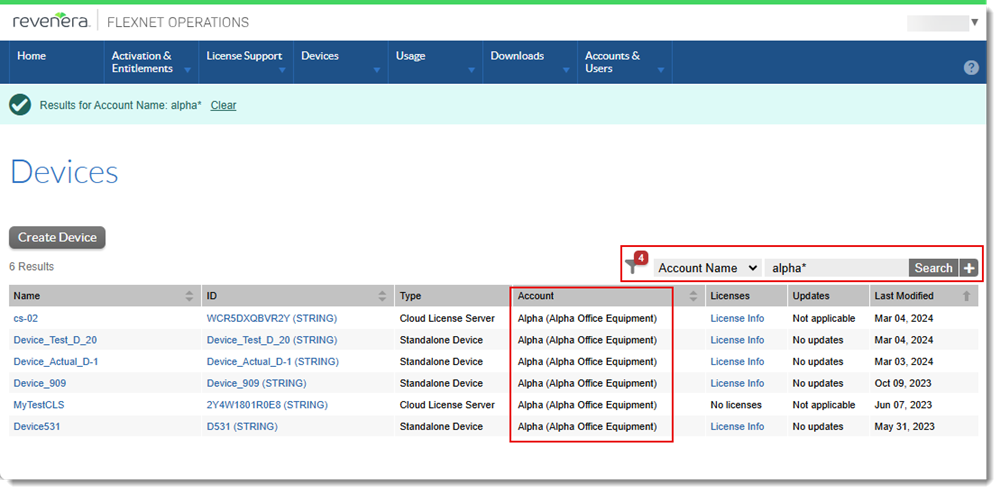
Example screenshot showing filtering devices by account name