Entitlement Management Issues Resolved
The following issues were resolved for entitlement management in the 2025 R1 release.
| • | Creating Entitlements and Accounts in Offline Environment |
| • | Product and Line Item Description in Email No Longer Showing “<br>” Instead of Line Breaks |
| • | Resolved Issue with Invalid Characters in Entitlement Emails Sent Using Web Services |
| • | Deselecting Boolean Entitlement Custom Attributes With Names Containing More Than 30 Characters |
| • | Displaying License Issue Date in UTC |
| • | Harmonizing the Behavior to Allow Mapping of Expired Line Items |
| • | Updating Start or Expiration Date No Longer Fails When Start Date Option Is Not “Specify Value Now” |
| • | Start Date No Longer Changes When FlexNet Publisher Licenses Are Rehosted |
| • | New Configuration to Limit Device Search to Device Owner |
| • | Automatic Renewal No Longer Causing Spurious Error Message |
| • | Resolved End-User Portal Login Issue |
| • | Bulk Upgrade Jobs With Auto-Fulfill No Longer Failing |
| • | Corrected Wording of Warning Message When Removing Users |
| • | Controlling Behavior When Transferring Entitlements With New Activation ID and Entitlement ID |
| • | Bulk Operations Email Now Includes Entitlement Line Item Custom Attribute Information |
| • | Configuration Option “Show Line Items with Zero Copies by Default” Now Working as Expected |
| • | Transferring Entitlements with Linked Maintenance to New Account |
| • | Changing a Line Item’s Start Date No Longer Updates Its Expiration Date |
| • | Offline License Return Requiring Confirmation |
| • | Resolved Error in License Model Creation Process |
| • | Feature Overrides Now Propagated to CLS Instances |
| • | Updates to License Model Attributes Can Be Propagated to Cloud Licensing Service |
| • | Request Button Now Triggering Renewal Email |
| • | Entitlement Line Item Start or Expiry Updated Using "Change Start/Expiration Date" Button Now Reflected on CLS |
| • | Confirmation Step No Longer Skipped During License Count Update |
| • | Restrict Activations on Expired Line Items for FlexNet Publisher Products |
| • | Google reCAPTCHA Challenge Now Displays Complete Set of Pictures, Allowing to Send Entitlement Emails |
| • | Saving a Feature with Space in Version Number Triggers Meaningful Error Message |
| • | Rearranging Features on the Products Page in the Producer Portal |
| • | Filter "Is remaining copies more than zero?" Now Working as Expected in Producer Portal |
| • | Resolved Discrepancy Between Number of Entitlements in End-User Portal and Producer Portal |
| • | Download Now Link in End-User Portal Now Working As Expected |
Creating Entitlements and Accounts in Offline Environment
(Case 02906417, SWM-23875)
In the 2024 R1 On-Premises release, an error occurred when attempting to create entitlements and accounts in environments without internet connectivity.
This issue has been resolved. The functionality now works in both online and offline environments.
Product and Line Item Description in Email No Longer Showing “<br>” Instead of Line Breaks
(SWM-20718)
When using the Producer Portal for sending an entitlement email for a product with multiple line items, the line items are now presented on separate lines. Previously, they were erroneously presented in a continuous paragraph, where the line breaks were indicated by <br>.
Resolved Issue with Invalid Characters in Entitlement Emails Sent Using Web Services
(Cases 02745509, 02863731; SWM-18974)
When entitlement emails are sent using the web service operation emailEntitlement and the product description contains any line breaks, these line breaks are now reflected as expected in the line item description. In previous releases, line breaks could be rendered as invalid characters when the HTML Content section (in the Email Template Content section of the Entitlement Email template) contained the [[DESCRIPTION]] merge tag and if the relevant product description included line breaks.
In the 2024.07 release, line breaks are now reflected as expected in the line item description.
Deselecting Boolean Entitlement Custom Attributes With Names Containing More Than 30 Characters
(SWM-20454)
Previously, during entitlement creation, certain custom attributes could not be deselected once the entitlement had been saved. This issue occurred for custom attributes that matched the following criteria:
| • | Name contains more than 30 characters |
| • | Entity type Entitlement |
| • | Type Boolean |
The issue only occurred when creating and saving an entitlement in the Producer Portal. It did not occur when using web services or the Data Import Template.
This issue has now been resolved.
Displaying License Issue Date in UTC
(Case 02795034, SWM-19471)
By default, the issue date that is returned by the /features endpoint is always calculated in Pacific Time. In certain scenarios, this can result in mismatched dates for issued and receivedTime in the /features endpoint response.
To avoid these mismatched dates, this release introduces a new configuration Use UTC timezone for license issue date (under System > Configure > Embedded Devices > Host Options). When the configuration is selected, the issue date of a license is displayed in Coordinated Universal Time (UTC).
Harmonizing the Behavior to Allow Mapping of Expired Line Items
(Case 02814955, SWM-20627)
Previously, the behavior for allowing or denying the mapping of expired line items to a license server was inconsistent.
The following configuration options (under System > Configure > Embedded Devices > Host Options) control whether mapping expired line items using web services or activating expired line items using a FlexNet Embedded client is allowed:
| • | Allow expired line items to be mapped to devices or servers—If selected, expired line items can be mapped to a device or server |
| • | Allow Duration License Decrease AND/OR Allow Duration License Decrease for Producer—If selected, licenses with duration-based features can have their copies reduced by a non-producer user or a producer, respectively. (Normally, licenses using durations only allow increasing the number of copies.) |
The following table specifies whether mapping expired line items using web services or activating expired line items using a FlexNet Embedded client is allowed, depending on the combination of selected configuration options:
|
Allow expired line items to be mapped to devices or servers |
Allow Duration License Decrease AND/OR Allow Duration License Decrease for Producer |
Mapping expired line items to server or device (using web services or FlexNet Embedded client) |
|
Unselected |
OFF |
Not allowed |
|
Selected |
OFF |
Allowed |
|
Unselected |
ON |
Not allowed |
|
Selected |
ON |
Allowed |
Updating Start or Expiration Date No Longer Fails When Start Date Option Is Not “Specify Value Now”
(SWM-21795)
Previously, changing the start date and/or expiration date using the Change Start/Expiration Date button failed if during entitlement creation, a line item’s start date was set to any option other than Specify Value Now. The resulting issue depended on the selection for the expiration date:
| • | If the expiration date is set to Specify Value Now, the start date value on the Configure Line Item panel is not updated accordingly. |
| • | If the expiration date is set to Permanent or Specify Expiration Date, FlexNet Operations returns an application error. |
This issue no longer occurs.
Start Date No Longer Changes When FlexNet Publisher Licenses Are Rehosted
(Case 02849875, SWM-19963)
When rehosting duration-based FlexNet Publisher licenses with the start date option Use Each Activation Date, the start date no longer resets to the date when the rehost operation occurs. Equally, the licenses’ end date remains unchanged when they are rehosted.
New Configuration to Limit Device Search to Device Owner
(SWM-20241)
Previously, a search for devices by device owner (account ID or account name) would also return devices that were not owned by the account specified in the search, if the device had add-on license entitlements mapped from the account specified in the search.
This release introduces a configuration called Limit device search by device owner (under System > Configure > FlexNet Operations > Embedded Device Settings), which allows producers to restrict search results only to devices owned by the account specified in the search.
By default, the option is unselected (preserving the previous behavior, whereby search results can also include devices that are not owned by the account specified in the search but have add-on license entitlements mapped from the account specified in the search).
The configuration option controls the behavior for device searches in the Producer Portal, End-User Portal, and using the ManageDeviceService web service.
Automatic Renewal No Longer Causing Spurious Error Message
(SWM-22055)
If a line item is configured to automatically renew, and the Auto Renew option is later deactivated, FlexNet Operations no longer erroneously displays an error when changing the expiration date in the Change Start/Expiration Date dialog to a new date that would be later than the original renewal expiration date.
Resolved End-User Portal Login Issue
(Case 02779816, SWM-22469)
Previously, users could log in to the End-User Portal using an activation ID from an inactive or obsolete entitlement. This issue no longer occurs, and users can no longer access the portal with such IDs.
Bulk Upgrade Jobs With Auto-Fulfill No Longer Failing
(SWM-21435)
Bulk upgrade jobs that have auto-fulfill set to Yes no longer fail.
Corrected Wording of Warning Message When Removing Users
(Case 02867154, SWM-20939)
When removing an end customer or channel partner from an entitlement, the Producer Portal now displays an appropriate prompt, Do you want to remove the selected account(s)?.
Controlling Behavior When Transferring Entitlements With New Activation ID and Entitlement ID
(Case 02549610, SWM-21073)
When transferring an entitlement containing a line item where some line item copies have already been activated and specifying that a new entitlement ID and activation ID are generated, the new account will receive the entitlement with the full amount of line item copies. However, the copies that have previously been activated are still mapped to the previous device and can be used to generate licenses.
To avoid such a scenario, this release introduces a new element to the EntitlementOrderService SOAP web service, called returnRemainingLineItems, and a new configuration option Transfer entitlement with remaining quantity only (under System > Configure > FlexNet Operations > General Options), which help producers control the behavior when transferring entitlements with a new entitlement ID and activation ID to another account.
If the configuration option Transfer entitlement with remaining quantity only is selected, transferring the entitlement with a new entitlement and activation ID will transfer only the number of undeployed line items.
The returnRemainingLineItems setting is used during the transfer of entitlements using SOAP services when the configuration option Transfer entitlement with remaining quantity only is selected. If the configuration is unselected, the returnRemainingLineItems setting has no impact on the transfer process.
| • | When returnRemainingLineItems is enabled (true): During an entitlement transfer, if some line items are already deployed, the remaining undeployed line items will be transferred to the target entitlement. |
Example: Suppose entitlement E1 with activation AC1 has a quantity of 100, and 20 line items have been deployed. If returnRemainingLineItems is enabled, the remaining 80 undeployed line items will be transferred to the target entitlement.
| • | When returnRemainingLineItems is disabled (false): During an entitlement transfer, if some line items are already deployed, an error message will be returned, indicating that the entitlement cannot be transferred because certain line items are already deployed. |
Example: Suppose entitlement E1 with activation AC1 has a quantity of 100, and 20 line items have been deployed. If returnRemainingLineItems is disabled, an error message will be returned as part of the response.
By default, returnRemainingLineItems is set to false.
Bulk Operations Email Now Includes Entitlement Line Item Custom Attribute Information
(Case 02884242, SWM-22636)
Entitlement line items that are associated with custom attributes are now displayed as expected in bulk operation notification emails.
Configuration Option “Show Line Items with Zero Copies by Default” Now Working as Expected
(Cases 02553109, 02843547, 02876825, 02905595; SWM-13867)
In previous releases, the End-User Portal displayed line items with zero copies remaining on the Activatable Items and the Manage Entitlements pages even if the configuration option Show Line Items with Zero Copies by Default was unselected, meaning that such line items should be hidden. This has now been resolved, and the option, if unselected, hides line items that have zero copies remaining.
Transferring Entitlements with Linked Maintenance to New Account
(Case 02767923, SWM-20253)
Previously, when transferring an entitlement with a linked maintenance to another account, the linked maintenance was not transferred. Only the entitlement line items for the entitlement were transferred to the new account. This could cause the Product Version Upgrade job to fail.
To address this, release 2025 R1 introduces a new configuration Transfer maintenance line items from other entitlements (under System > Configure > FlexNet Operations > General Options). If selected, when transferring an entitlement to another account, any maintenance line items are also transferred, if these maintenance line items are linked to a line item belonging to the entitlement being transferred. If the linked maintenance line item is linked to a different entitlement (that is, not the entitlement that is being transferred), the transfer is not performed and an error message is displayed.
By default, the configuration option is unselected (meaning that only the entitlement line items for the entitlement are transferred to the new account).
Changing a Line Item’s Start Date No Longer Updates Its Expiration Date
(SWM-22987)
When updating a line item’s start date in the Change Start/Expiration Date widget, the line item’s expiration date is no longer erroneously also updated.
Offline License Return Requiring Confirmation
(Cases 02857961, 02880341, 02900219, 02904405; SWM-20700)
In previous releases, if the configuration option Skip Confirmation or Skip Confirmation for Producer (under System > Configure > Embedded Devices > License Generation) was not selected, the system erroneously did not require confirmation for reducing the number of copies via an offline activation request. The capability response included the following parameter:
{
"confirmationRequestNeeded" : false
}
This issue was addressed in the 2024.10 release. Now, when the option Skip Confirmation or Skip Confirmation for Producer is unselected, and an offline activation file for reducing license counts is uploaded to FlexNet Operations, the capability response that is subsequently generated and loaded into the local license server will show the following:
{
"confirmationRequestNeeded" : true
}
Resolved Error in License Model Creation Process
(SWM-22881)
During license model creation, the setting “Is this a counted model” is now working as expected. This means that if it is set to Yes, a counted license model is created. Previously, even if “Is this a counted model” was set to Yes, the created license model erroneously was uncounted.
Also, the field isCounted in the getLicenseModelIdentifier operation of the ProductPackagingService web service now shows the correct value.
Feature Overrides Now Propagated to CLS Instances
(SWM-23755)
In previous releases, when changing a substitution value of a feature override for a feature, the changes were not populated to the relevant Cloud Licensing Service (CLS) instances and were not included in the response when calling the /features endpoint.
In this release, this issue no longer occurs and feature overrides are propagated to the CLS instances. This fix ensures reliable and consistent license data and simplifies the process of updating and managing licenses, reducing manual errors.
In addition, a new configuration option called Maximum number of products to be updated following an attribute change was introduced (under System > Configure > FlexNet Operations > Embedded Device Settings). The option enables producers to specify the maximum number of products that should be updated on CLS instances whenever an attribute value for a feature has been changed.
The default setting is 200. Producers who want to specify a higher number should consider that the more products a feature is associated with, the more changes are propagated to CLS instances, which may negatively impact performance.
Updates to License Model Attributes Can Be Propagated to Cloud Licensing Service
(Case 02917977, SWM-23727)
Previously, changes to license model attributes were not propagated to the relevant Cloud Licensing Service (CLS) instance and the devices it served.
The 2024.12 release introduces functionality that enables producers to update license model attributes and have them reflected on existing devices in the field. To allow the propagation of license model attributes, producers must select the newly introduced configuration option Trigger Product Notifications when License Models are updated as well as the existing configuration option Allow Editing of Deployed Entities (both are located under System > Configure > FlexNet Operations > General Options).
Effects on Performance
If Trigger Product Notifications when License Models are updated is selected, all devices using a product that is linked to the updated license model are updated. For each affected product, one notification is passed to the Cloud Licensing Service and License Fulfillment Service, which then pass the notification to the device running the product. The large number of notifications sent negatively affects performance of all functionality served by the Cloud Licensing Service and License Fulfillment Service.
Revenera therefore recommends not to select Trigger Product Notifications when License Models are updated.
Producers should also note that the updates to license model attributes take time to propagate, especially if they have a large number of products and devices. Depending on the number of products and devices, an update might take 1-5 minutes to be reflected.
Request Button Now Triggering Renewal Email
(Case 02890657, SWM-22556)
On the End-User Portal’s Expiring Entitlements page, end users can click a Request button to send an email message to the producer about their intent to renew selected entitlements.
In previous releases, the End-User Portal failed to send such renewal emails. In the 2025.01 release, this issue has been resolved. When an end user clicks the Request button, the End-User Portal sends a renewal email to the email address specified in the configuration option Request Renewal Notification Email (under System > Configure > FlexNet Operations > Renewals). That email address is also used to populate the From field. The end user requesting the renewal will receive receive a copy of the renewal email, as their email address is included in the Cc field.
Important:Renewal emails are sent only if the following conditions are fulfilled:
| • | An email address is specified in the configuration option Request Renewal Notification Email (under System > Configure > FlexNet Operations > Renewals). |
| • | The email address specified in Request Renewal Notification Email has been verified in the Producer Portal on the Email/Domain Verification page (available from the Administer menu in the Email group). |
Entitlement Line Item Start or Expiry Updated Using "Change Start/Expiration Date" Button Now Reflected on CLS
(Case 02913332, SWM-24187)
Previously, when an entitlement was mapped to a Cloud Licensing Service (CLS) instance and one of its line items had its start or expiration date changed using the Change Start/Expiration Date button on the Entitle Customers to Licenses | Create an Entitlement page (under Entitlements > List Entitlements by Order > click the entitlement’s hyperlinked ID), the new start or expiration date was not reflected on the CLS instance. This means that served clients' subsequent capability requests were not aligned with the new start or expiration date.
This issue no longer occurs. An entitlement line item’s changed start or expiration date is now immediately reflected on the mapped CLS instance, and can be viewed as follows:
| • | On the View Server page (Devices > Devices > click a hyperlinked device name > View > View Response) in the Capability Response section. |
| • | Calling the /features endpoint. |
Confirmation Step No Longer Skipped During License Count Update
(Case 02912962, SWM-24195)
Previously, when removing line items mapped to a local license server or a standalone device, FlexNet Operations was not enforcing the step where a confirmation of changes is needed before quantities on the device are updated, even though the configuration option Skip Confirmation or Skip Confirmation for Producer was unselected.
The bug occurred when Generate Response was triggered on the View Server or Device page (under Devices > Devices > click hyperlinked name of a device), which changed the license status to License generated and decreased the license count on the device without waiting for the device to confirm the changes. This bypassed the expected Waiting for confirmation status, which should remain until the device explicitly sends a confirmation request.
This has been fixed in the 2025.01 release. Clicking Generate Response now changes the license status to Waiting for confirmation. The license count is only updated on the device after it has sent a capability request to confirm the changes.
The following table shows the behavior and license status when a user clicks Generate Response after a license count change, depending on the selection of the Skip Confirmation and Skip Confirmation for Producer configuration options.
|
Skip Confirmation |
Skip Confirmation |
Behavior in 2025.01 |
|
Unselected |
Unselected |
Status changes to Waiting for confirmation. Once a capability request is sent or uploaded, the status changes to License generated and the license count is updated on the device. |
|
Selected |
Selected |
Status changes to License generated. Once a capability request is sent or uploaded in the Producer Portal and the End User Portal, the license count is updated on the device. |
|
Selected |
Unselected |
Status changes to License generated. Once a capability request is sent or uploaded in the Producer Portal or the End User Portal, the license count is updated on the device. |
|
Unselected |
Selected |
Status changes to License generated. Once a capability request is sent or uploaded in the Producer Portal (and optionally in the End User Portal), the license count is updated on the device. |
Restrict Activations on Expired Line Items for FlexNet Publisher Products
(Case 02144139, SWM-23877)
Previously, when an end user attempted to activate an expired FlexNet Publisher line item (using web services or the appactutil utility) and that line item had previously been activated on a client, the request erroneously succeeded. The reason for this behavior was that FlexNet Operations located the relevant fulfilment record and treated the activation as a reinstall. However, this behavior resulted in clients being able to continue using the software beyond the license expiration date.
To address this issue, FlexNet Operations now checks the line item expiration date before activation. If a line item has expired then the activation request is denied and an error message is shown.
This change applies to all types of activations (online, offline, manually, or via web services). Other license lifecycle operations such as return, repair, or rehost are not affected.
Google reCAPTCHA Challenge Now Displays Complete Set of Pictures, Allowing to Send Entitlement Emails
(Case 02552507, SWM-20758)
In the Producer Portal, if the Google reCAPTCHA challenge is active, the Google reCAPTCHA challenge now displays a complete set of pictures when attempting to send entitlement emails from the List Entitlements page.
To send an email from the List Entitlements page (under Entitlements > List Entitlements), select an entitlement and click Email. On the next page, click I’m not a robot. The Google reCAPTCHA challenge displays a set of pictures and prompts you to select certain pictures to prove that you are human before sending the email.
Previously, some of the pictures were missing, making it impossible for users to complete the challenge and send emails from the List Entitlements page (by selecting an entitlement and clicking Email).
The following screenshots show an example of the reCAPTCHA screen with missing pictures and the same page with the fix:
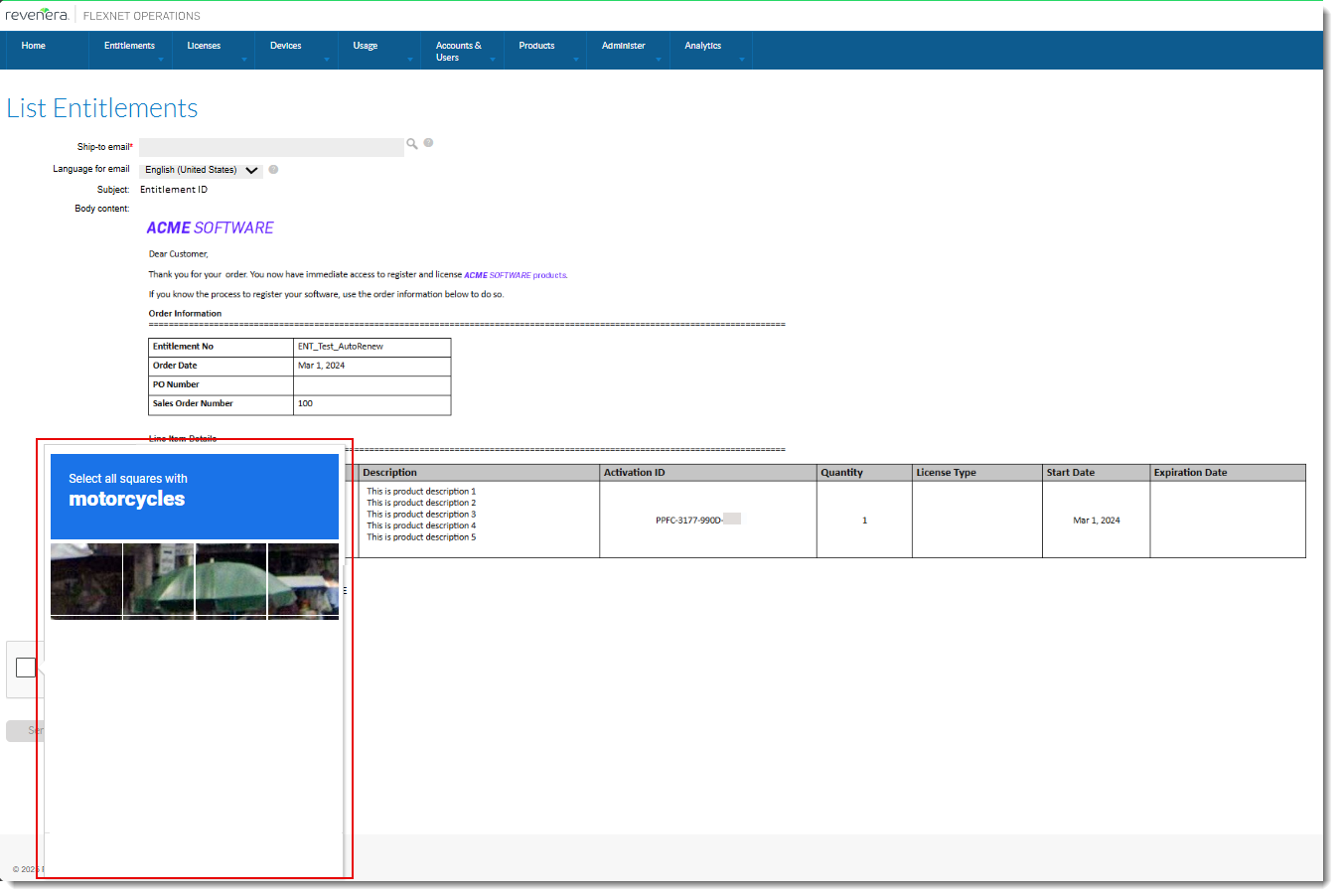
Entitlement email with corrupted reCAPTCHA panel
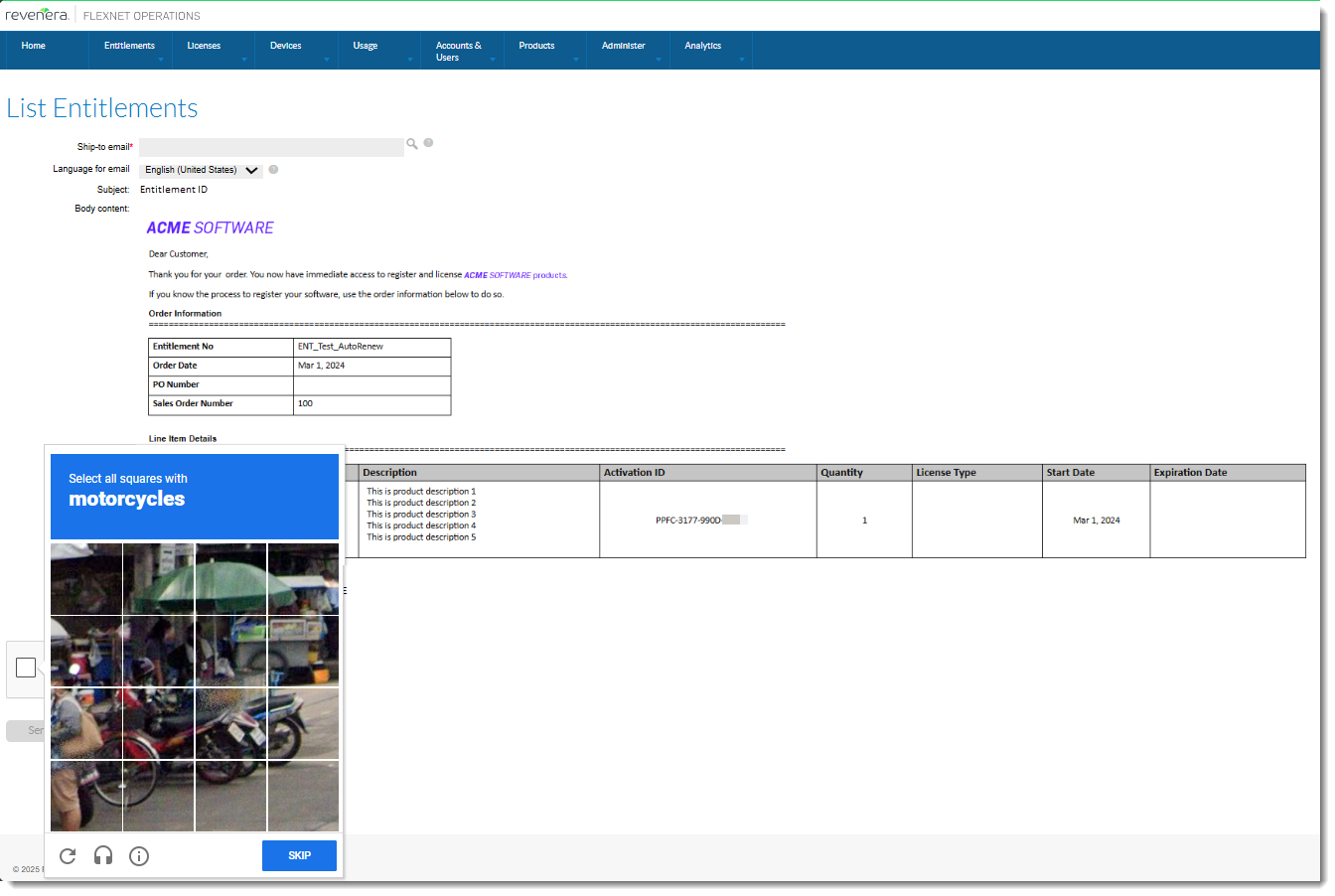
Entitlement email with fixed reCAPTCHA panel, showing all pictures.
Note:To use Google reCAPTCHA, the following configuration options must be set:
| • | Recaptcha Site key and Recaptcha Secret password (under System > Configure > FlexNet Platform Server > General Options) |
| • | Use Recaptcha validation when sending entitlement emails (under System > Configure > FlexNet Operations > General Options) must be selected. |
Saving a Feature with Space in Version Number Triggers Meaningful Error Message
(Case 02990348, SWM-25307)
In previous releases, when a feature was created with the Version Format Type set to Fixed and the Version field included a space (for example, “1.0 “), the feature was created successfully. However, adding such features to a product later failed with the following error message:
The version string "2.0 " for feature "TestSpaceInVersionField" is not a valid FlexNet version: must be <number>.<number> [Incident# 9379-0620915R]
To be able to map the feature to a product, producers had to return to the feature and modify the version to remove spaces, which caused frustration and wasted producers’ time.
New Behavior
In the 2025.03 release, producers are alerted during the feature creation process that a feature with the Version Format Type set to Fixed cannot have a version number containing spaces. If a feature’s Version Format Type is set to Fixed and the Version field contains a space, upon saving the feature the following error message is displayed:
The version format is invalid. Please follow the standard format and avoid any spaces.
The following screenshot shows the Package Products | Create a Feature page with the red banner and the error message, because the version includes a space (“1.0 “):
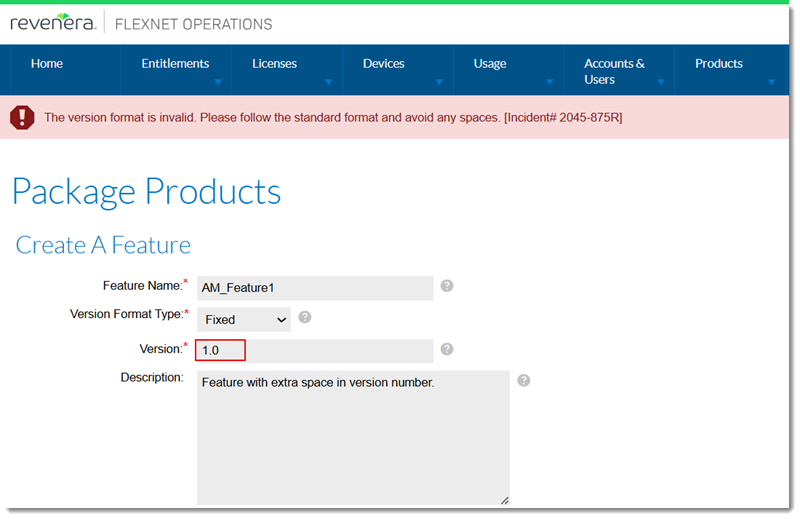
The Package Products | Create a Feature page with the red banner and error message
Rearranging Features on the Products Page in the Producer Portal
(Case 02858726, SWM-22618)
On the Products page (under Products > Product > click a product name), features and feature bundles (on the Features tab) can now be sorted based on the date they were added to the product. By default, they are arranged in ascending order (the oldest feature or feature bundle is displayed at the top of the list). The order can be reversed by clicking the header of the Feature or Feature Bundle Name column.
The following screenshot shows the Feature or Feature Bundle Name column where the order of features can now be changed.
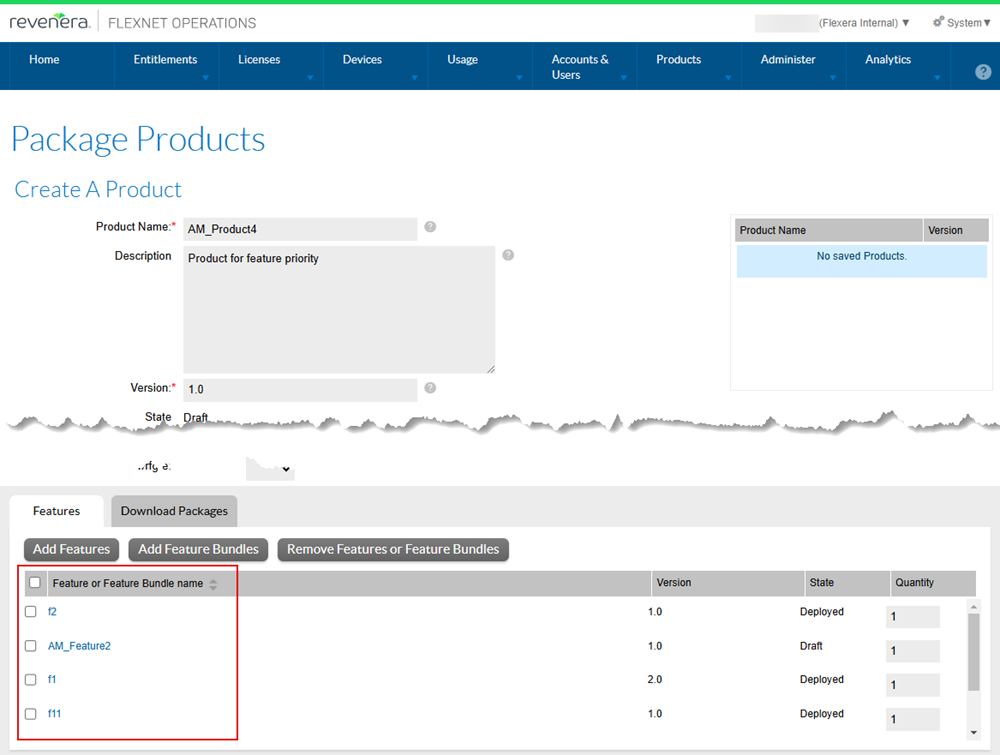
On the Package Products | Create a Product page, the order of features can now be changed.
Note:When exporting feature information (using either .jar or Data Import template (.xlt) format), the feature to product linkage is reset to have the timestamp of the import.
Filter "Is remaining copies more than zero?" Now Working as Expected in Producer Portal
(Case 02905595, SWM-25218)
This release resolves an issue with the option Is remaining copies more than zero? that is available in the Advanced search panel on the List Entitlements page. In previous releases, regardless of whether the option was set to Yes or No, the List Entitlements page showed entitlements with copies greater than 0 as well as those with 0 copies.
In the 2025.03 release, the option Is remaining copies more than zero? works as expected:
| • | Yes—The List Entitlements page shows only entitlements with copies greater than 0. |
| • | No—The List Entitlements page shows only entitlements with 0 copies. |
| • | None—The List Entitlements page shows entitlements with copies greater than 0 and those with 0 copies. |
The following screenshot shows the option Is remaining copies more than zero?:
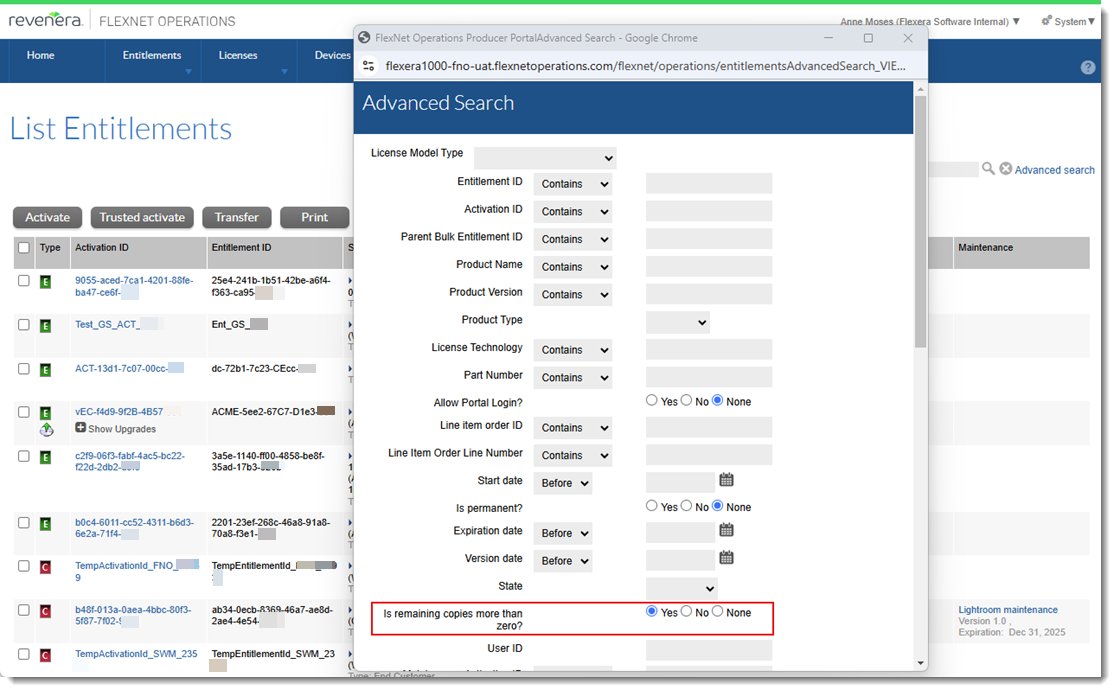
The Advanced search panel on the List Entitlements page
Resolved Discrepancy Between Number of Entitlements in End-User Portal and Producer Portal
(Cases 02979909, 02553109; SWM-24947, SWM-23317)
Previously, when the configuration option Show Line Items with Zero Copies by Default (under System > Configure > FlexNet Operations > General Options) is unselected, there was a discrepancy between the number of entitlements listed on the List Entitlements page in the Producer Portal and on the List Entitlements page in the End-User Portal. The reason was a synchronization issue, which meant that entitlements with an available quantity of zero were erroneously displayed on the List Entitlements page in the End-User Portal.
This issue no longer occurs, and the List Entitlements page shows the correct number of entitlements in both portals.
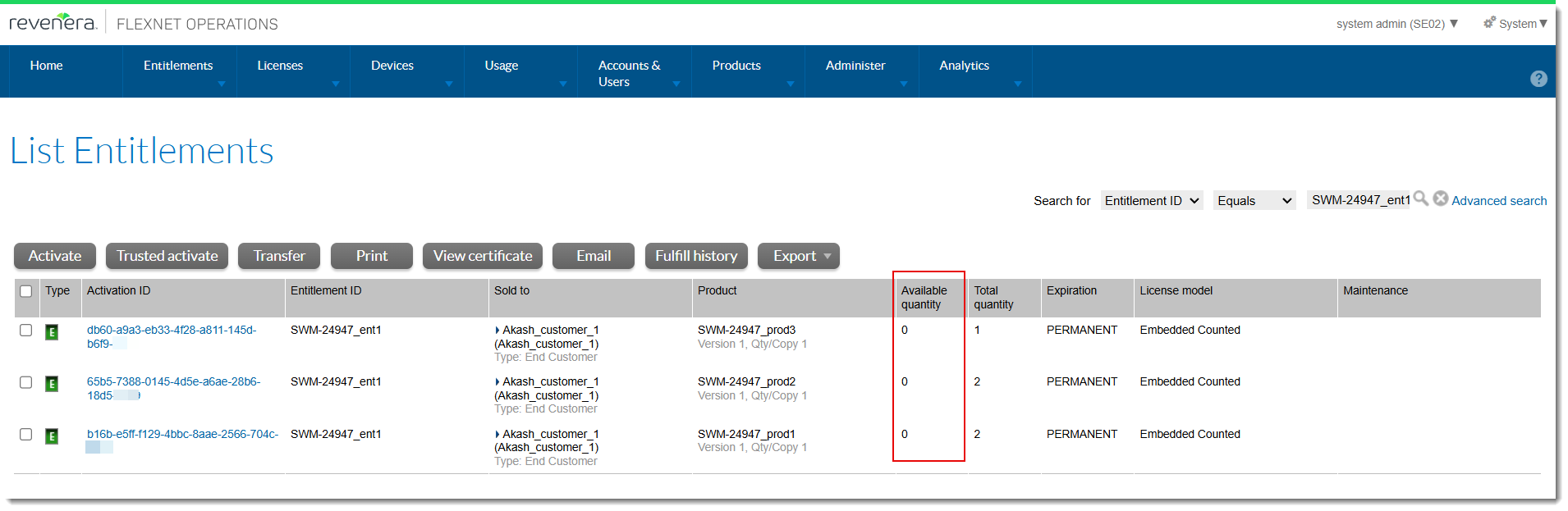
The List Entitlements page in the Producer Portal shows entitlements with zero available quantity only when the configuration option Show Line Items with Zero Copies by Default is selected.
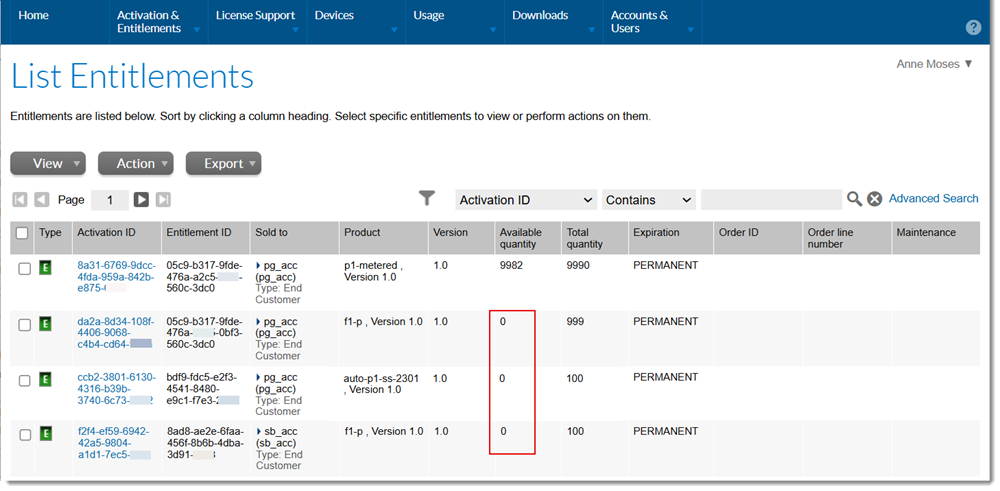
An example of the List Entitlements page in the End-User Portal showing entitlements with zero available quantity.
Download Now Link in End-User Portal Now Working As Expected
(Case 02989988, SWM-25688)
In the End-User Portal, download packages could previously not be downloaded from either the New Versions or Previous Versions tab on the Download Order page. (The Download Order page is available by selecting Activation & Entitlements > List Entitlements and clicking the Download Now link for an entitlement). Instead of a download link, both tabs showed the error message “There are currently no available downloads defined for your account.” However, downloads were indeed available, as confirmed on the List Downloads page.
This problem has now been resolved. If a user has an entitlement that has download packages associated, they will be able to download the download packages from the New Versions tab.
In addition, expired or archived download packages are now displayed and can be downloaded from the Previous Versions tab.
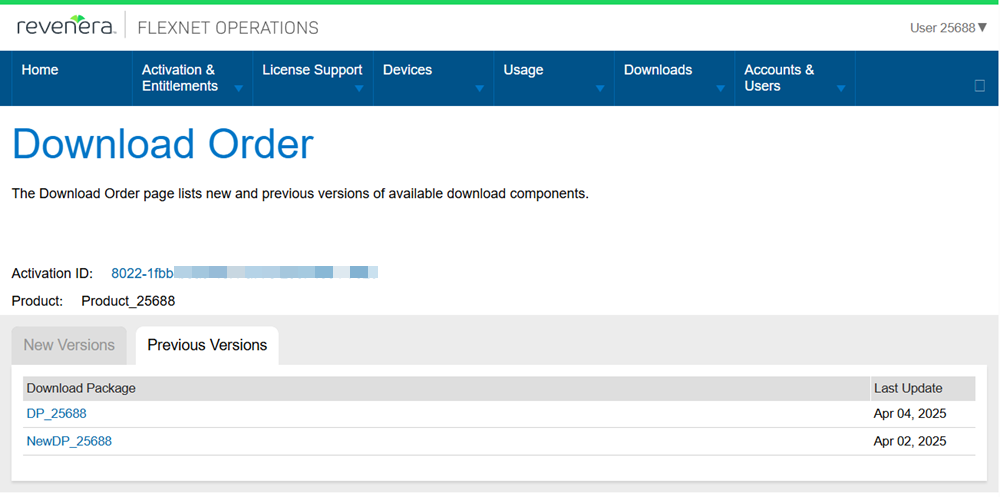
The Download Order page now shows expired or archived download packages on the Previous Versions tab.