SOAP and REST Web Services Enhancements
The following enhancements were added to the SOAP and REST Web Services module in the 2025 R1 release.
| • | Zero Mapping of Activation IDs on Cloud License Servers Using ManageDevice SOAP Web Service (Version 7) |
| • | Returning Fulfillment and License Information for Non-Embedded Technologies Using LicenseService Web Service (Version 2) |
| • | New Operation for Getting Host Count in LicenseService Web Service (Version 2) |
| • | getEntitlementLineItemPropertiesQuery Returning Licenses for Multiple Accounts in EntitlementOrderService Web Service (Version 8) |
| • | Managing Upgrade Relationship Using EntitlementOrderService Web Service (Version 7) |
| • | Returning Users from All Related Accounts Using UserAcctHierarchyService (Version 6) |
| • | UserAcctHierarchyService Version 6: Returning User Information for Multiple Accounts Using UserAcctHierarchyService (Version 6) |
| • | Event Notification API: Device Event Notifications Published to Webhook |
| • | Event Notification Service REST API Supporting Event Notifications for Device Events |
| • | Product Packaging Data Extract Now Includes Product Version |
Zero Mapping of Activation IDs on Cloud License Servers Using ManageDevice SOAP Web Service (Version 7)
(SWM-25022)
The 2025 R1 release introduces version 7 of the ManageDevice SOAP web service. The new version contains a new operation, zeroCountAddonLineItems, which enables producers to explicitly set an activation ID with a zero allocation mapping on a Cloud License Server (CLS) instance.
This enhancement enables customers to clearly distinguish between activation IDs that are fully entitled for allocation (full count) and those that are restricted for allocation on the CLS.
Previously, when querying activation IDs via SOAP services like searchDevices, there was no easy way to identify activation IDs that were intentionally restricted from allocation. Such activation IDs simply did not appear, making it difficult for customers to differentiate between no mapping and full allocation from the master entitlement.
By explicitly creating a zero allocation mapping, producers can track and manage entitlement behavior accurately, improving license compliance and allocation control across their deployments.
Notes for Using zeroCountAddonLineItems
| • | The configuration option Allow mapping zero counts to FlexNet Embedded devices (under System > Configure > FlexNet Operations > Embedded Device Settings) must be selected. |
| • | Values submitted in the web request are not validated. As long as the request contains a valid device ID and line item details, the relevant mapping will be updated. |
| • | No validation takes place. Whatever mapping line item customer provides is mapped to a particular device, regardless of e.g. whether the license model is supported. |
| • | Information related to calling the zeroCountAddonLineItems operation will be tracked and can be reviewed on the Search Transactions page in the Producer Portal (under System > Transaction History). |
Example Request for zeroCountAddonLineItems
The sample code, below, shows a request to allocate zero counts from activation ID 83a2-9824-c72b-488t-bbde-9bbb-fce3-1344 to the device with ID devicel_type.
<soapenv:Envelope xmlns:soapenv="http://schemas.xmlsoap.org/soap/envelope/" xmlns:xsd="http://www.w3.org/2001/XMLSchema" xmlns:xsi="http://www.w3.org/2001/XMLSchema-instance">
<soapenv:Header/>
<soapenv:Body>
<urn:zeroCountAddonLineItemsRequest>
<!-- 1 or more repetitions: -->
<urn:requestList>
<urn:deviceIdentifier>
<urn:deviceType>SERVER</urn:deviceType>
<!-- Optional: -->
<urn:deviceId>devicel_type</urn:deviceId>
<!-- Optional: -->
<urn:serverIds>
<!-- 1 or more repetitions -->
<urn:serverId>device1_type</urn:serverId>
</urn:serverIds>
<!-- Optional: -->
<urn:deviceIdType>ETHERNET</urn:deviceIdType>
<!-- Optional: -->
<urn:publisherName>FLEXERA</urn:publisherName>
</urn:deviceIdentifier>
<!-- 1 or more repetitions: -->
<urn:lineItem>
<urn:lineItemIdentifier>
<!-- Optional: -->
<urn:activationId>83a2-9824-c72b-488t-bbde-9bbb-fce3-1344</urn:activationId>
<!-- Optional: -->
<urn:count>0</urn:count>
<!-- Optional: -->
</urn:lineItemIdentifier>
</urn:lineItem>
</urn:requestList>
</urn:zeroCountAddonLineItemsRequest>
</soapenv:Body>
</soapenv:Envelope>
Example Response for zeroCountAddonLineItems
The sample code, below, shows a response for a successful request.
<soapenv:Envelope xmlns:soapenv="http://schemas.xmlsoap.org/soap/envelope/" xmlns:xsd="http://www.w3.org/2001/XMLSchema" xmlns:xsi="http://www.w3.org/2001/XMLSchema-instance">
soapenv:Body
<zeroCountAddonLineItemsResponse xmlns="urn:v7.fne.webservices.operations.flexnet.com">
<statusInfo>
<status>SUCCESS</status>
</statusInfo>
<responseData>
<deviceIdentifier>
<deviceType>SERVER</deviceType>
<deviceId>device1_type</deviceId>
<serverIds>
<serverId>device1_type</serverId>
</serverIds>
<deviceIdType>ETHERNET</deviceIdType>
<publisherName>FLEXERA</publisherName>
</deviceIdentifier>
</responseData>
</zeroCountAddonLineItemsResponse>
</soapenv:Body>
</soapenv:Envelope>
Returning Fulfillment and License Information for Non-Embedded Technologies Using LicenseService Web Service (Version 2)
(Case 02370066, SWM-22714)
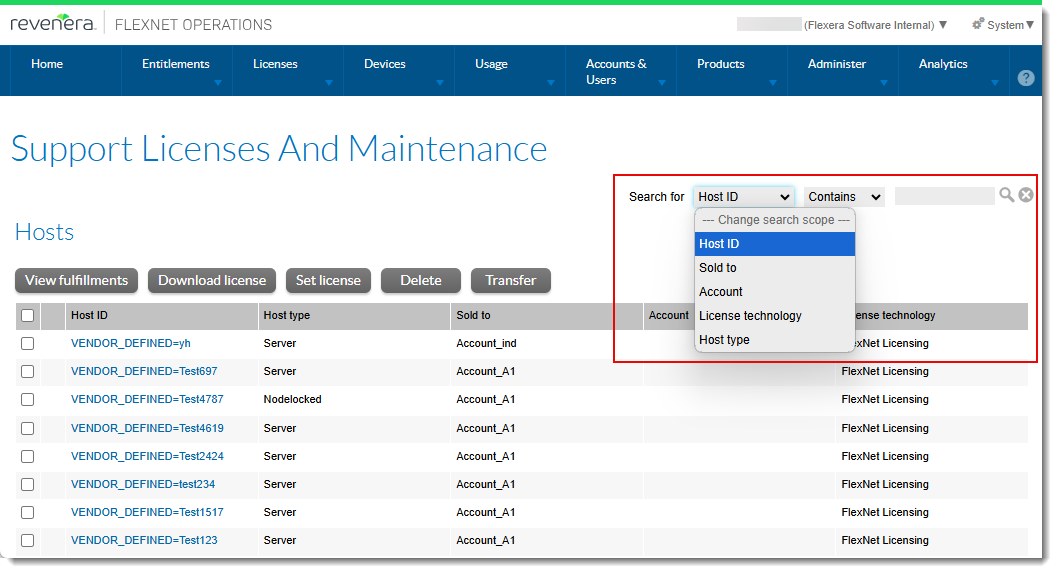
In the Producer Portal, producers can list fulfillment or license information for non-embedded licensing technology (such as FlexNet Publisher) for specific hostids on the Support Licenses and Maintenance page (under Licenses > Hosts). The following screenshot shows the Support Licenses and Maintenance page along with the search options:
To provide the same functionality using web services, the 2025 R1 release now introduces version 2 of the LicenseService SOAP web service. This enhancement enables producers to do the following:
| • | Collect all hostids to provide a list of current hostids for new activations |
| • | Collect all active fulfillments for a dedicated server in preparation to create "emergency" licenses for that server |
| • | Collect fulfillment and license information in preparation to rehost a server |
Implementation of getHostQuery
Version 2 of the LicenseService SOAP web service includes the new operation getHostQuery. The following XML fragment illustrates a getHostQuery message:
<operation name="getHostQuery">
<input message="tns:getHostQueryRequest"/>
<output message="tns:getHostQueryResponse"/>
</operation>
The operation getHostQuery extracts the same information as that available on the Support Licenses and Maintenance page: Host ID, Sold To, Account, License Technology, and Host Type. In addition, producers can filter for hosts that have active or inactive fulfillments.
Tip:For pagination, producers can use the getHostCount operation to determine the number of hosts and specify that number in the batchSize parameter (see New Operation for Getting Host Count in LicenseService Web Service (Version 2) ).
The following snippet shows sample XML code:
<soapenv:Envelope xmlns:soapenv="http://schemas.xmlsoap.org/soap/envelope/" xmlns:urn="urn:v2.webservices.operations.flexnet.com">
<soapenv:Header/>
<soapenv:Body>
<urn:getHostQueryRequest>
<!--Optional:-->
<urn:queryParams>
<!--Optional:-->
<urn:hostId>
<urn:value>?</urn:value>
<urn:searchType>?</urn:searchType>
</urn:hostId>
<!--Optional:-->
<urn:soldTo>
<urn:value>?</urn:value>
<urn:searchType>?</urn:searchType>
</urn:soldTo>
<!--Optional:-->
<urn:licenseTechnology>
<urn:value>?</urn:value>
<urn:searchType>?</urn:searchType>
</urn:licenseTechnology>
<!--Optional:-->
<urn:hostType>
<urn:value>?</urn:value>
<urn:searchType>?</urn:searchType>
</urn:hostType>
<!--Optional:-->
<urn:account>
<urn:value>?</urn:value>
<urn:searchType>?</urn:searchType>
</urn:account>
<!--Optional:-->
<urn:fulfillmentState>
<urn:value>?</urn:value>
<urn:searchType>?</urn:searchType>
</urn:fulfillmentState>
</urn:queryParams>
<urn:pageNumber>?</urn:pageNumber>
<urn:batchSize>?</urn:batchSize>
</urn:getHostQueryRequest>
</soapenv:Body>
</soapenv:Envelope>
New Operation for Getting Host Count in LicenseService Web Service (Version 2)
(Related to Case 02370066, SWM-25245)
Along with the getHostQuery operation (see Returning Fulfillment and License Information for Non-Embedded Technologies Using LicenseService Web Service (Version 2)), version 2 of the LicenseService SOAP web service also introduces the getHostCount operation. getHostCount returns the number of hosts that match specified criteria.
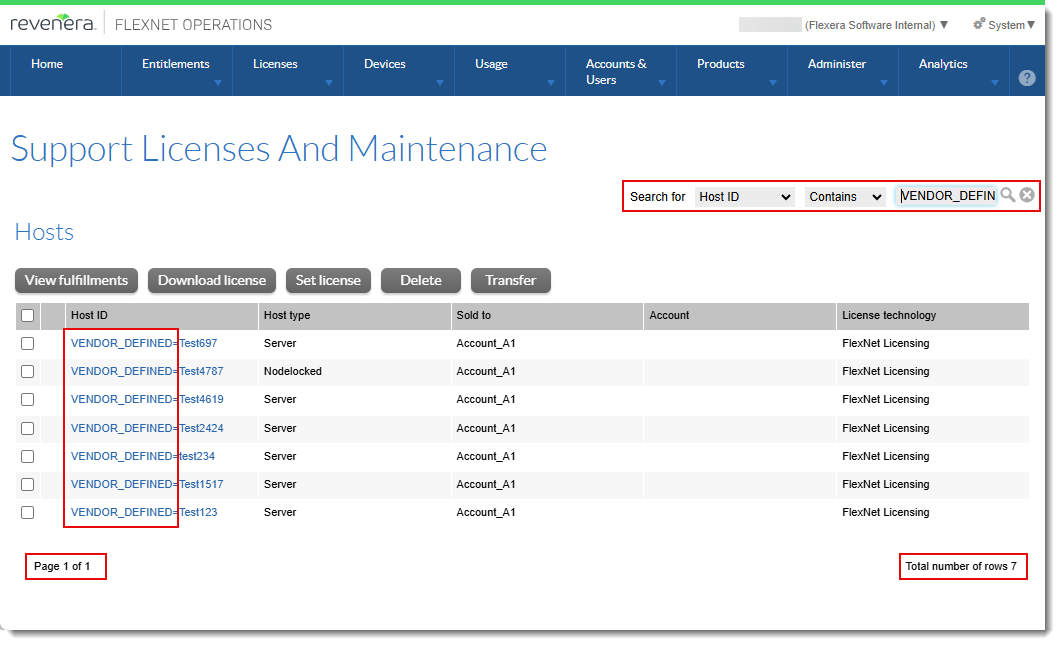
This operation is equivalent to displaying the number of hosts that fit certain criteria by filtering hosts using the Search for option in the Producer Portal in the Support Licenses and Maintenance page:
Implementation of getHostCount
The following XML fragment illustrates a getHostCount message:
<operation name="getHostCount">
<input message="tns:getHostCountRequest"/>
<output message="tns:getHostCountResponse"/>
</operation>
The operation getHostCount returns the number of hosts that fit specified criteria. The following search criteria are available: Host ID, Sold To, Account, License Technology, and Host Type.
Tip:The returned number can be used as the batch size input for getHostQuery (see Returning Fulfillment and License Information for Non-Embedded Technologies Using LicenseService Web Service (Version 2)).
The following snippet shows sample XML code:
<soapenv:Envelope xmlns:soapenv="http://schemas.xmlsoap.org/soap/envelope/" xmlns:urn="urn:v2.webservices.operations.flexnet.com">
<soapenv:Header/>
<soapenv:Body>
<urn:getHostCountRequest>
<!--Optional:-->
<urn:queryParams>
<!--Optional:-->
<urn:hostId>
<urn:value>?</urn:value>
<urn:searchType>?</urn:searchType>
</urn:hostId>
<!--Optional:-->
<urn:soldTo>
<urn:value>?</urn:value>
<urn:searchType>?</urn:searchType>
</urn:soldTo>
<!--Optional:-->
<urn:licenseTechnology>
<urn:value>?</urn:value>
<urn:searchType>?</urn:searchType>
</urn:licenseTechnology>
<!--Optional:-->
<urn:hostType>
<urn:value>?</urn:value>
<urn:searchType>?</urn:searchType>
</urn:hostType>
<!--Optional:-->
<urn:account>
<urn:value>?</urn:value>
<urn:searchType>?</urn:searchType>
</urn:account>
<!--Optional:-->
<urn:fulfillmentState>
<urn:value>?</urn:value>
<urn:searchType>?</urn:searchType>
</urn:fulfillmentState>
</urn:queryParams>
</urn:getHostCountRequest>
</soapenv:Body>
</soapenv:Envelope>
getEntitlementLineItemPropertiesQuery Returning Licenses for Multiple Accounts in EntitlementOrderService Web Service (Version 8)
(Case 02877724, SWM-23429)
The EntitlementOrderService web service has been updated to v8, with a modified getEntitlementLineItemPropertiesQuery which now allows searching by multiple account names. The <urn:value> element of the complex element <urn:accountUnitName> can be repeated multiple times to search by multiple account names.
This change enables producers to retrieve the licenses and detailed licensing information for specified accounts.
The number of accounts to search for can be limited using a new configuration option called Maximum number of Account names accepted to search for Entitlement Line Item Properties (under System > Configure > FlexNet Operations > General Options).
If the number of <urn:value> elements in the request exceeds the configured limit, an error message will be returned.
Using multiple <urn:value> elements
The following limitations apply when supplying multiple <urn:value> elements as search parameters:
| • | If the query also includes other search parameters, then for those parameters only the default values are considered. |
| • | The <urn:searchType> parameter is optional. If used, it accepts only EQUALS. Any other value passed for <urn:searchType> will result in an error message. |
| • | The <urn:partnerTier> will not be used and a default of search by ANY partner tier will be applied. |
Note:The limitations only apply when using multiple elements. If a single <urn:value> element is provided, then the behavior of the search is the same as in v7 (meaning that all allowed values for <urn:searchType> or <urn:partnerTier> can be used as search criteria).
Snippet of a sample request
<urn:searchEntitlementLineItemPropertiesRequest>
<urn:queryParams>
<urn:accountUnitName>
<!--1 or more repetitions:-->
<urn:value>MyAccount01</urn:value>
<urn:value>MyAccount02</urn:value>
<urn:value>MyAccount03</urn:value>
<urn:value>MyAccount04</urn:value>
<urn:value>MyAccount05</urn:value>
</urn:accountUnitName>
</urn:queryParams>
</urn:searchEntitlementLineItemPropertiesRequest>
Effects on Entitlement Order REST Endpoints
Note the following changes to the request object for Entitlement Order REST endpoints.
Entitlement Order REST endpoints have two objects in the request: accountId and accountUnitName. No changes have been made to the accountId (PartnerTierQueryTypeDTO) object. However, the accountUnitName (AccountNamesQueryTypeDTO) object now accepts a string array for the field value. Currently, only a single value is supported. Searching by multiple account names is enabled only in the getEntitlementLineItemPropertiesQuery webservice operation.
Usage Example
{
"queryParams": {
"accountUnitName": {
"value": ["ACME"],
"searchType": "STARTS_WITH"
}
}
}
Managing Upgrade Relationship Using EntitlementOrderService Web Service (Version 7)
(Case 02860233, 02746301; SWM-20708, SWM-21094)
Version 7 and later versions of the EntitlementOrderService SOAP web service enable producers to add or remove an Upgrade relationship between two valid line items. In the updateEntitlementLineItem method, the parentLineItem element now includes the element lineItemType, which supports the new value NEW.
This functionality was already available in the Producer Portal, and this enhancement now creates parity between the Producer Portal and SOAP web services.
Sample code for creating an Upgrade relationship
Provide valid activation IDs for the lineItemData and parentLineItem elements, and specify the value UPGRADE for lineItemType, as shown in the following example:
<soapenv:Envelope xmlns:soapenv="http://schemas.xmlsoap.org/soap/envelope/" xmlns:urn="urn:v7.webservices.operations.flexnet.com">
  <soapenv:Header/>
  <soapenv:Body>
    <urn:updateEntitlementLineItemRequest>
      <urn:lineItemData>
        <urn:entitlementIdentifier>
          <urn:primaryKeys>
            <urn:entitlementId>8380-7252-e0fc-4ddf-a203-0170-7120-de80</urn:entitlementId>
          </urn:primaryKeys>
        </urn:entitlementIdentifier>
        <urn:lineItemData>
          <urn:lineItemIdentifier>
            <urn:primaryKeys>
              <!-- Activation ID of line item that should be linked to a parent-->
              <urn:activationId>6e37-c975-5c79-47c9-a312-59ed-dafb-d872</urn:activationId>
            </urn:primaryKeys>
          </urn:lineItemIdentifier>
          <urn:description>Upgrade relationship added</urn:description>
          <urn:parentLineItem>
          <urn:uniqueId/>
            <urn:primaryKeys>
            <!-- Activation ID of line item that that will become a Parent reference -->
            <urn:activationId>5fe9-3acb-9b1a-4eec-8dc4-7792-9dc1-6fb7</urn:activationId>
              </urn:primaryKeys>
              <!-- New element added. Upgrade relation to be set with the Parent reference -->
              <urn:lineItemType>UPGRADE</urn:lineItemType>
            </urn:parentLineItem>
          </urn:lineItemData>
        <urn:autoDeploy>false</urn:autoDeploy>
      </urn:lineItemData>
    </urn:updateEntitlementLineItemRequest>
  </soapenv:Body>
</soapenv:Envelope>
Sample code for removing an Upgrade relationship
Provide valid activation IDs for the lineItemData and parentLineItem elements, and specify the value NEW for lineItemType, as shown in the following example:
<soapenv:Envelope xmlns:soapenv="http://schemas.xmlsoap.org/soap/envelope/" xmlns:urn="urn:v7.webservices.operations.flexnet.com">
  <soapenv:Header/>
  <soapenv:Body>
    <urn:updateEntitlementLineItemRequest>
      <urn:lineItemData>
        <urn:entitlementIdentifier>
          <urn:primaryKeys>
            <urn:entitlementId>8380-7252-e0fc-4ddf-a203-0170-7120-de80</urn:entitlementId>
          </urn:primaryKeys>
        </urn:entitlementIdentifier>
        <urn:lineItemData>
          <urn:lineItemIdentifier>
            <urn:primaryKeys>
              <urn:activationId>9875-c692-7e64-4c80-89ab-9c8e-adcc-4f5b</urn:activationId>
            </urn:primaryKeys>
          </urn:lineItemIdentifier>
          <urn:description>Unlink parent relation</urn:description>
          <urn:parentLineItem>
          <urn:uniqueId/>
            <urn:primaryKeys>
              <urn:activationId>5fe9-3acb-9b1a-4eec-8dc4-7792-9dc1-6fb7</urn:activationId>
            </urn:primaryKeys>
            <urn:lineItemType>NEW</urn:lineItemType>
          </urn:parentLineItem>
        </urn:lineItemData>
        <urn:autoDeploy>false</urn:autoDeploy>
      </urn:lineItemData>
    </urn:updateEntitlementLineItemRequest>
  </soapenv:Body>
</soapenv:Envelope>
Returning Users from All Related Accounts Using UserAcctHierarchyService (Version 6)
(Case 02809222, SWM-21120)
In the UserAcctHierarchyService web service (newly introduced version 6), producers can use the new optional field usersFromLinkedAccount to provide one account ID to return all users belonging to that account and to any of its direct sub-accounts.
The field usersFromLinkedAccount is available for the getUsersQuery and getUsersCount operations.
The following example describes the behavior. Assume an organization has the following accounts:
| • | Account A1 is the parent of sub-accounts a1 and a1.1 |
| • | Account a1.1 is the parent of sub-account a1.2 |
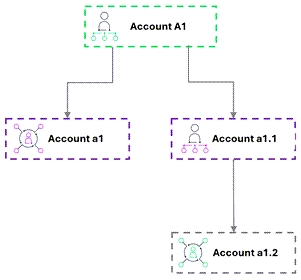
A query for account ID or account name A1 with usersFromLinkedAccount = true would return users from all three accounts—A1, a1, and a1.1—that are directly linked to A1:
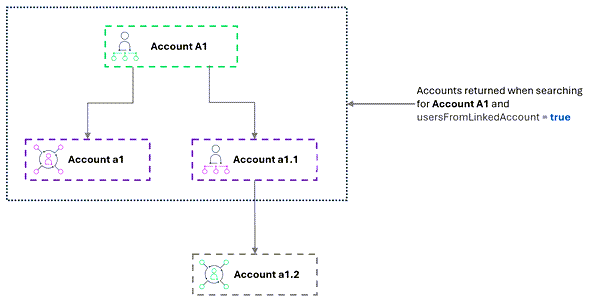
When searching for account ID or account name a1.1, users from accounts a1.1 and a1.2 will be listed in the response, but no users from A1:
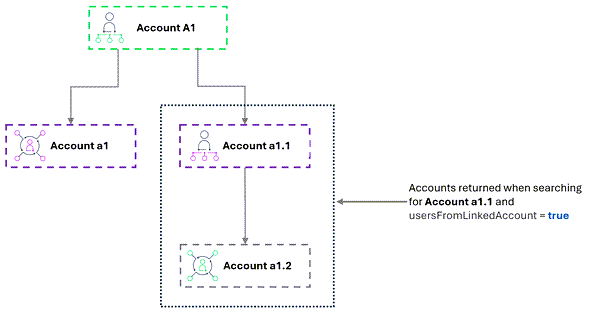
When usersFromLinkedAccount is set to true, only one account ID and/or account name can be provided as search parameter. A search using more than one account ID returns the following error: “Multiple Account Ids cannot be provided in the request when usersFromLinkedAccount is set to true.”
UserAcctHierarchyService Version 6: Returning User Information for Multiple Accounts Using UserAcctHierarchyService (Version 6)
(Case 02809222, SWM-20374)
Producers can now use version 6 of the of the SOAP web service UserAcctHierarchyService to retrieve user information for multiple accounts using a single API call. This enhancement reduces the number of API calls required to return user information. To retrieve information for multiple accounts, producers specify the 10 account IDs in the getUsersQuery API request.
By default, the number of account IDs that can be specified is limited to 10 accounts. The limit is controlled by a new configuration option, Number of accounts and associated user information to retrieve via SOAP API (under System > Configure > FlexNet Platform Server > General Options), which allows producers to modify this limit. Setting the option to -1 allows querying an unlimited number of accounts. Producers should bear in mind that specifying -1 might have a negative impact on system performance.
Event Notification API: Device Event Notifications Published to Webhook
(SWM-23427)
Producers can now use the Event Notification Service API to trigger an event notification whenever a change is made to a license server. Real-time data about the event is delivered to a specified webhook URL where the data can be consumed programmatically to update the producer’s upstream or downstream systems.
Changes that can now trigger an event notification include the following:
| • | Changes to license server attributes like device name, site name, notes, device owner, set of line items mapped to it, or the quantities mapped. |
| • | Certain events on the license server, such as: |
| • | Return license server |
| • | Move license server |
| • | Mapping entitlements to license server |
| • | Removing license from license server |
| • | Mapping activation ID to license server |
Event Notification Service REST API Supporting Event Notifications for Device Events
(SWM-20802)
Producers can now use the Event Notification Service API to trigger an event notification whenever a specific event related to devices occurs. Real-time data about the event is delivered to a specified webhook URL where the data can be consumed programmatically to update the producer’s upstream or downstream systems.
The following parameters have been added to the /notificationService endpoint:
| • | deviceSubscription—Set to true to subscribe to event notifications for device changes. |
| • | deviceWehookUrl—Webhook endpoint that receives the information about device events. |
Product Packaging Data Extract Now Includes Product Version
(Case 02488178, SWM-19920)
When exporting a set of products using the Product Packaging Data Extract job (controlled by the Data Extract REST APIs), the resulting ProductsLicenseModel-<date and time>.csv file now includes a ProductVersion column which specifies the product version for each product listed in the file.
Inclusion of the ProductVersion column in the CSV file is controlled by a new configuration option called Show product version in extract file (under System > Configure > FlexNet Operations > General Options). By default, the option is not selected (meaning that the CSV file does not include product version information).
This enhancement enables producers to differentiate between products that have different versions.