User Experience Issues Resolved
The following issues involving user experience were resolved in the 2025 R1 release.
| • | Announcements Not Visible on End-User Portal Home Page |
| • | Duplicate Configuration Options After Upgrade |
| • | Sorting Licenses Table on Device Page |
| • | Resolved Date Format Issue in Served Devices Data Extract |
| • | Avoiding Consolidation Error in End-User Portal |
| • | Sorting Licenses Table on Devices Page in End-User Portal |
| • | Confirmation Message for Configuration Changes |
| • | Configuration Changes Now Updated After Saving |
| • | Increased Download Speed in End-User Portal |
| • | Updated Link to Customer Community |
| • | Removed Truncation in End-User Portal on View Server Page |
| • | System Roles No Longer Visible in Portals |
| • | Resolved Issue of Incorrectly Formatted Page in End-User Portal |
Announcements Not Visible on End-User Portal Home Page
(Case 02991834, SWM-25522)
The Announcements section on the Home page of the End-User Portal did not display any content, despite announcements being configured.
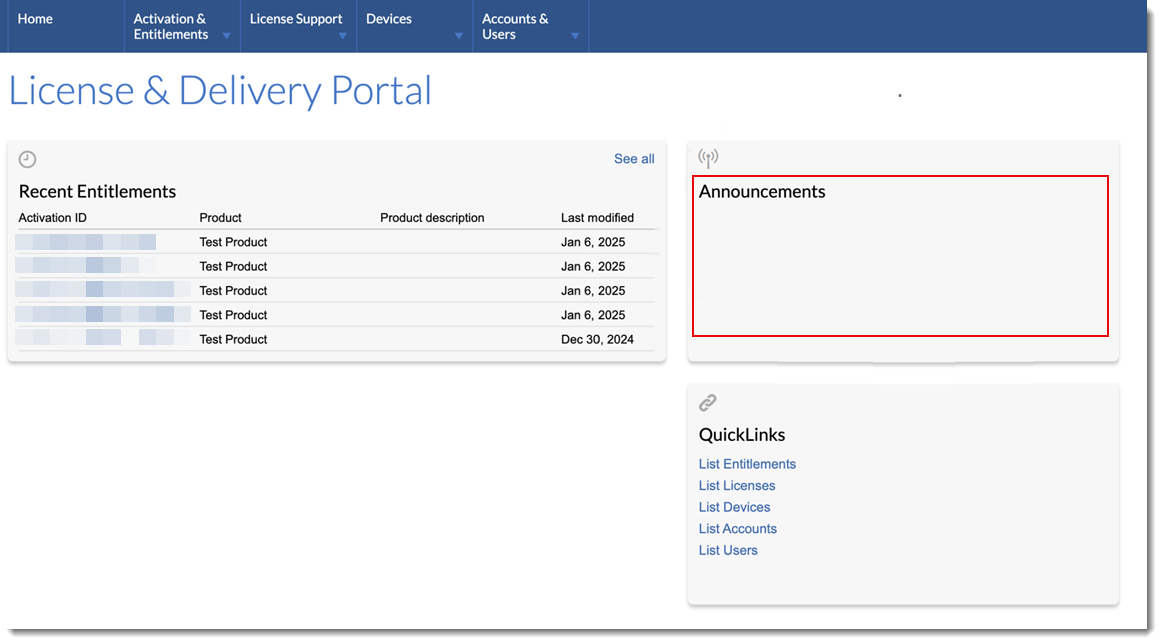
Empty Announcements section in the End-User Portal.
This issue has been resolved in the 2025 R1 release.
Duplicate Configuration Options After Upgrade
(Case 02841988, SWM-25848)
Following an upgrade from FlexNet Operations On-Premises 2021 R1 to 2024 R1, some users observed duplicate configuration entries appearing in the system, as shown in the following screenshot:
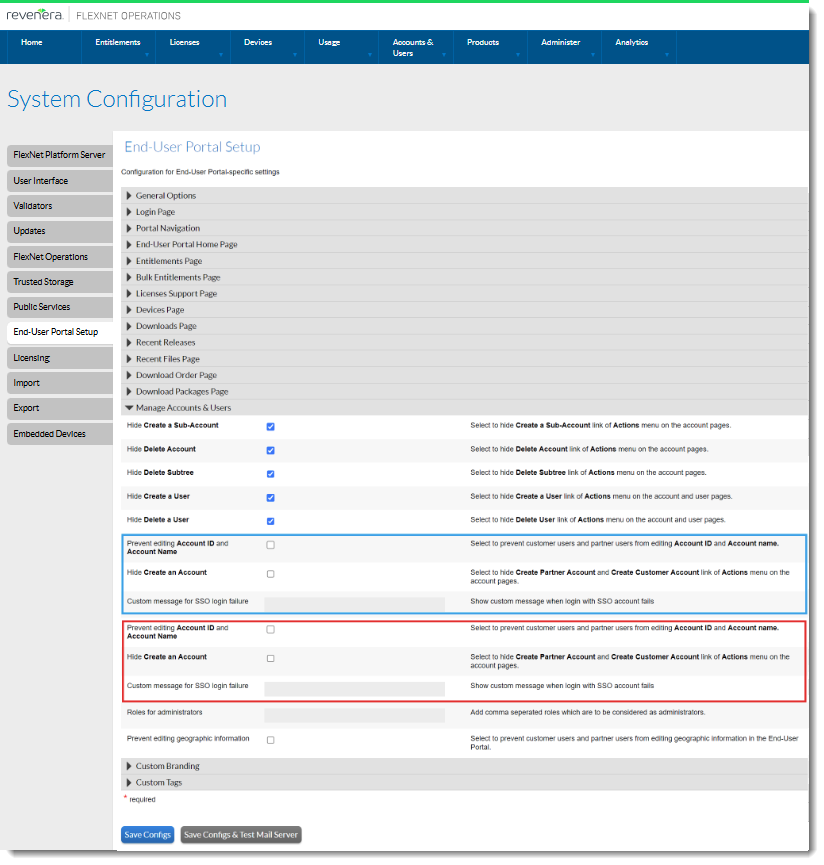
Duplicate options on the System Configuration page
This issue has been resolved. In the latest release, configuration data will no longer be duplicated during the upgrade process.
Sorting Licenses Table on Device Page
(SWM-22619)
On the View Server or Device page in the Producer Portal, the Licenses table can now be sorted by Expiration or Expiration Status using the toggle icon in the column header. Also, the headers of the Expiration and Expiration Status columns are now properly aligned.
Resolved Date Format Issue in Served Devices Data Extract
(SWM-22841)
The Served Devices Data Extract now shows the correct expiration dates.
Avoiding Consolidation Error in End-User Portal
(Case 02234869, SWM-21264)
When end users are consolidating line items and the list contains inactive line items, the inactive line items are automatically ignored. This means that inactive line items are no longer causing consolidation errors, improving the overall user experience.
Sorting Licenses Table on Devices Page in End-User Portal
(SWM-22619)
Previously, on the View Server or Device page in the End-User Portal, none of the columns of the Licenses table could be sorted.
Now, the Licenses table can be sorted by Expiration or Expiration Status using the toggle icon in the column header for all types of devices. Also, the headers of the Expiration and Expiration Status columns are now centered vertically.
Confirmation Message for Configuration Changes
(SWM-22817)
When changing any configuration (under System > Configure), the Producer Portal now shows a confirmation message: The configuration was updated successfully.
Previously, such a confirmation message was only displayed when changing a configuration value in the section Embedded Devices > Host Options.
Configuration Changes Now Updated After Saving
(SWM-22817)
In previous releases, when changing a configuration setting under Embedded Devices (under System > Configure) and clicking Save Configs, the previous setting (either the previous value or selected/unselected state of the check box) was still shown. The updated setting was only visible after clicking Save Configs a second time. In addition, after saving changes, the confirmation message “The configuration was updated successfully” was formatted differently to other FlexNet Operations confirmation messages (using a white background instead of a blue banner).
Both issues have been resolved in the 2025.01 release. Changes to configuration settings are now saved and visible after clicking Save Configs once, and the confirmation message is formatted as a blue banner.
Increased Download Speed in End-User Portal
(Case 02776698, SWM-19906)
In the End-User Portal, end users associated with several accounts can now download content more quickly. The syncing process has been optimized, allowing users to access downloads shortly after their accounts and entitlements are provisioned.
Updated Link to Customer Community
(SWM-24485)
Following the recent introduction of the new Revenera Community, the link Customer Community (available in the Producer Portal from the System menu) has been updated to point to the Community’s new URL, https://community.revenera.com.
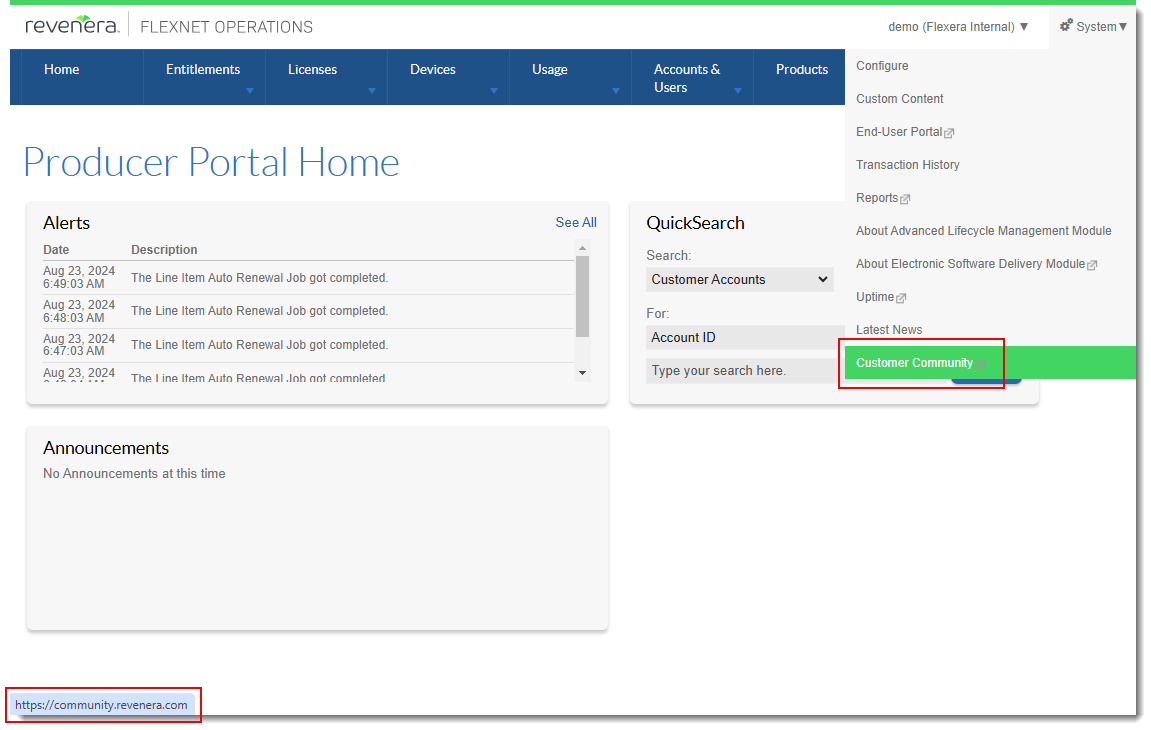
Any users attempting to access the previous URL, http://flexeracommunity.force.com/customer/, will be redirected to the new URL.
Removed Truncation in End-User Portal on View Server Page
(Case 02981114, SWM-24922)
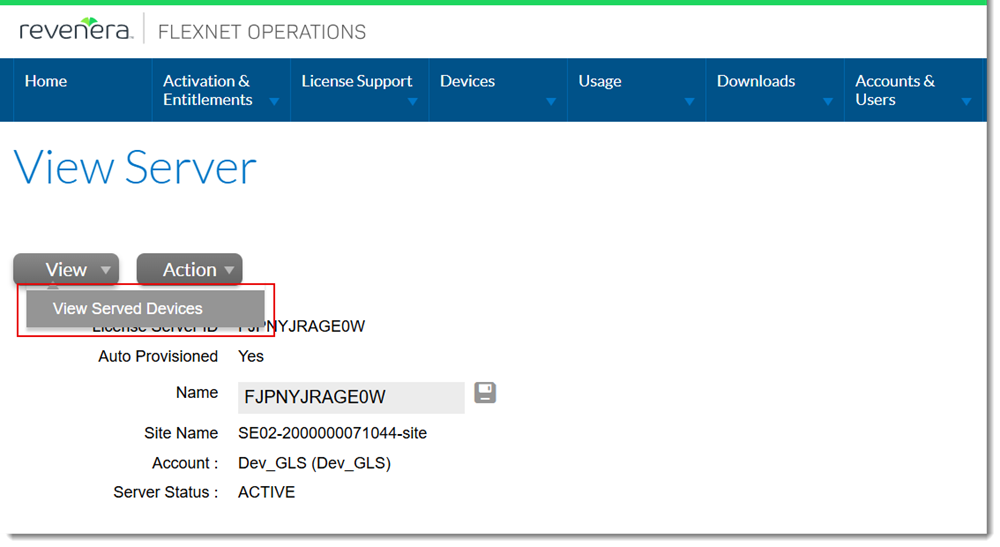
Previously, the menu options available from the View menu on the View Server page in the End-User Portal were truncated on the left side of the screen and not readable. To access the View Server page, click Devices > Devices, then click the hyperlinked name or ID for a server (Cloud License Server instance or local license server).
The following screenshot shows the fixed menu of the View Server page, with the menu options fully visible:
System Roles No Longer Visible in Portals
(Cases 03009399, 03009414, 3011796; SWM-26277)
The system roles Default Producer Role and Manage Impersonated Access Tokens PP, and Default Portal Role and Manage Impersonated Access Tokens EP are no longer visible in the Producer Portal and the End-User Portal, respectively.
These roles are not intended for selection by producers or end users. To avoid that they are mistakenly assigned they are now hidden from the Producer Portal and End-User Portal.
Note:The roles Manage Impersonated Access Tokens PP and Manage Impersonated Access Tokens EP contain permissions for issuing so-called impersonated access tokens, which are a means to securely authorize SOAP and REST web service calls to FlexNet Operations. While the term “impersonated” might sound concerning, it simply refers to a mechanism where a privileged user can securely act on behalf of another user with limited permissions.
Resolved Issue of Incorrectly Formatted Page in End-User Portal
(Case 02411062, SWM-26279)
In the End-User Portal, when associating an existing user to an account, the page for selecting users was not correctly formatted.
The issue could be seen by following these steps:
| 1. | Click Accounts & Users > List Accounts. |
| 2. | On the Accounts page, click a hyperlinked account ID. |
| 3. | In the Account Users section, click Actions > Link existing users. |
| 4. | Click the pagination arrow to see the next set of users. |
| 5. | You will see the page with formatting issues: |
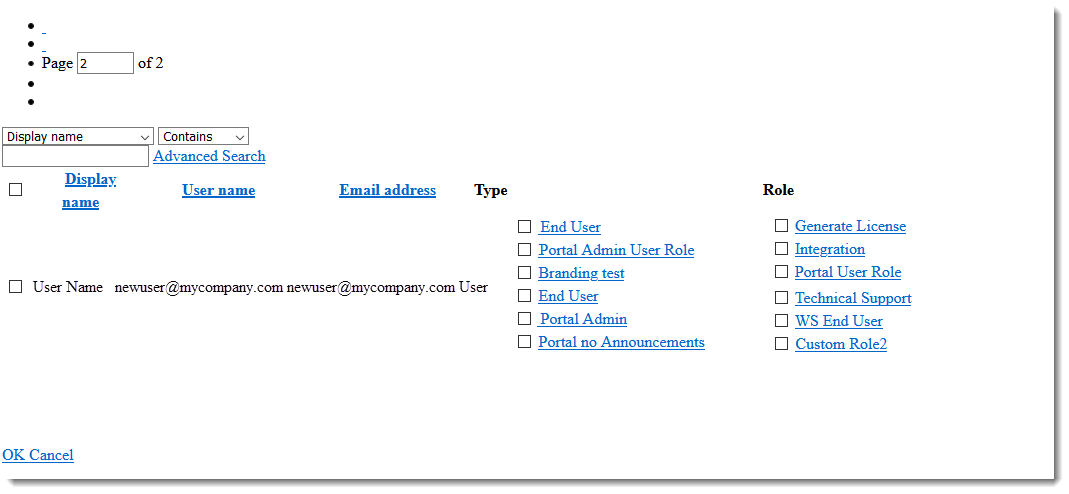
This issue no longer occurs.