Device Management Enhancements in 2026.01
The following enhancement to device management was added in the 2026.01 release.
Obsoleting Cloud License Servers in End-User Portal
(Case 03906962)
In the 2025.12 release, we introduced new functionality in the End-User Portal that allowed end users to obsolete local license servers and devices from the View Server and Device pages.
This capability has now been extended to include Cloud Licensing Service (CLS) instances.
Users can obsolete a Cloud License Server from the Cloud License Server Details page by selecting Obsolete Server from the Action menu, as shown in the following screenshot:
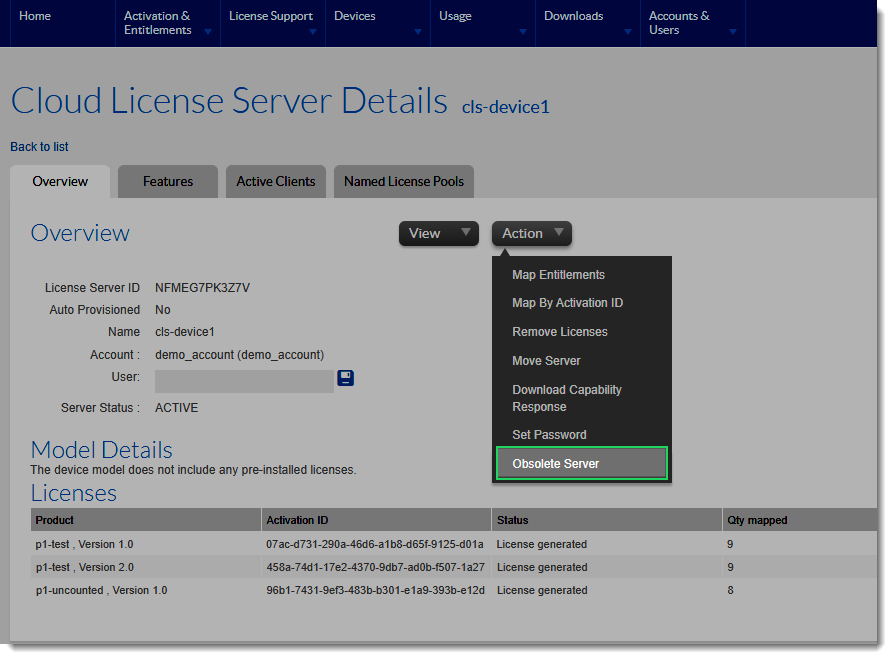
The Obsolete Server action provides the same functionality as the Make Obsolete feature in the Producer Portal.
Configuration & Permissions
The Obsolete Server option can be hidden by deselecting the system configuration option Allow Obsolete Devices/Servers (under System > Configure > End-User Portal Setup > Devices Page). By default, the configuration option is selected.
Only users with the permission Obsolete Devices/Servers (part of the Account Permissions - End-User Portal group) can view and use this action. This permission is assigned by default only to system administrator users.