Entitlement Management Enhancements in 2025.05
The following enhancements to entitlement management were added in the 2025.05 release.
| • | Ability to Limit Activation of FlexNet Embedded Nodelocked Licenses to Servers and/or Standalone Devices |
| • | CONTAINER_ID Host ID Now Available for Docker Containers |
| • | Merge Tags Added to Fulfillment On Hold Email Template to Improve Communication |
| • | Advanced Search for Entitlements Includes Custom License Models |
Ability to Limit Activation of FlexNet Embedded Nodelocked Licenses to Servers and/or Standalone Devices
(SWM-19823, SWM-24434)
Producers can now specify whether a nodelocked FlexNet Embedded license can only be activated on license servers, standalone devices, or both. This enhancement increases a producer’s control over license activation, and prevents license leakage caused by uncounted licenses being activated on a license server.
Controlling the activation of FlexNet Embedded licenses is done during license model creation (Administer > License Models > Create new license model). When selecting the license model type Embedded, producers can select where the license model can be activated using the new option, Hosted On. The following options are available:
| • | License Servers—Licenses can only be activated on license servers. Attempts to activate a license on a standalone device will fail. |
| • | Standalone Devices—Licenses can only be activated on standalone devices. Attempts to activate a license on a license server will fail. |
| • | Both—Licenses can be activated on license servers and on standalone devices. This is the default option. |
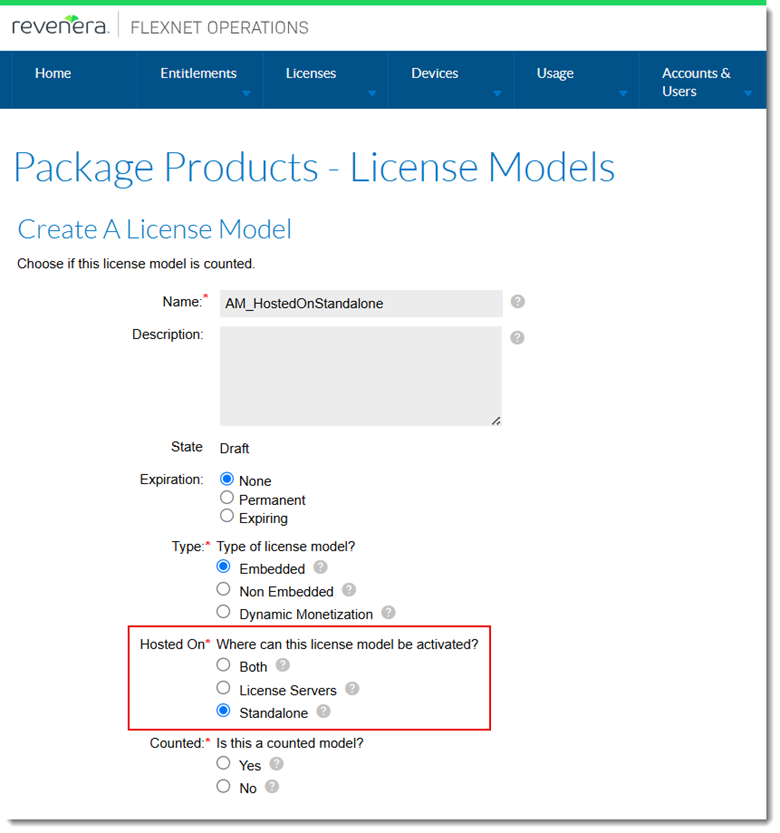
The Hosted On property is set during license model creation.
The above controls apply to online and offline activations and are enforced regardless of activation type (Producer Portal, Web services, capability requests).
Behavior when changing a license model for a product
To explain the behavior, consider that you have the following license models defined:
| • | License model 1: HostedOnServerOnly, Hosted On property set to License Servers |
| • | License model 2: HostedOnStandalone, Hosted On property set to Standalone |
When the license model of an existing product is changed—for example, the license model is changed from HostedOnServerOnly to HostedOnStandalone—FlexNet Operations will correctly validate license applicability based on device type.
While the entitlement line items are not removed automatically, once the license model is changed, licenses with HostedOnStandalone are no longer shown for Cloud Licensing Service (CLS) instances or local license servers. Users must manually remove entitlements if they are no longer valid for the device.
This behavior ensures that licenses meant only for standalone devices won't mistakenly appear for license servers, reducing confusion and helping enforce correct usage.
CONTAINER_ID Host ID Now Available for Docker Containers
(Case 02758504, SWM-19930)
The list of hostid types available for Flexnet Publisher certificate-based licensing now also includes the host ID type CONTAINER_ID. The CONTAINER_ID is used to node-locking a license server and feature licenses to a docker container host ID.
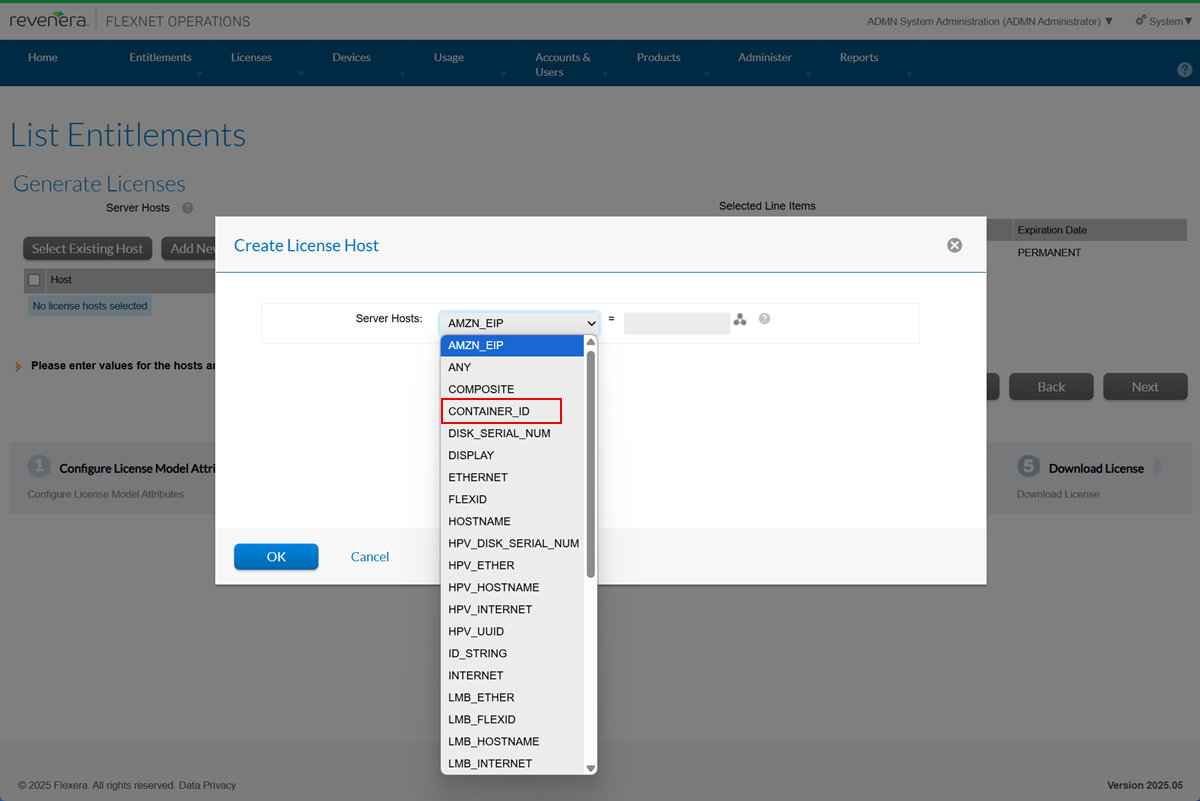
The CONTAINER_ID can be selected in the Create License Host window.
Producers wanting to use CONTAINER_ID as a host ID must build a new version of the Vendor Certificate Generator (VCG) executable and need to change the generator configuration to version 16.2.3.0. Instructions on how to build a new version can be found in the Flexnet Operations User Guide, topic Creating a FlexNet Publisher Licensing Toolkit License Generator (VCG) Configuration.
Merge Tags Added to Fulfillment On Hold Email Template to Improve Communication
(SWM-25684)
When an on-hold fulfillment is created, an email can be triggered to notify the producer that the fulfillment is waiting for a license to be set. The Fulfillment On Hold template, on which such an email would be based, has now been enhanced to include additional merge tags to include relevant details. (Previously, the only merge tag available in this template was [[FulfillmentID]].)
List of Merge Tags in Fulfillment On Hold Template
The following table lists all merge tags currently available in the Fulfillment On Hold template.
|
Merge Tag |
Description |
Example Preview Value |
|
[Acctld]] |
Account ID |
ACME |
|
[[AcctName]] |
Account Name |
MYORG |
|
[ACTIVATION_DATE]] |
Activation Date |
Feb 28, 2007 |
|
[[ActivationID]] |
Activation ID |
9e8f-8b6f-0fbf-4488-950b-e4a5-1bfe-e73c |
|
[[EntitlementID]] |
Entitlement ID |
bf1a-1191-4957-46aa-4f7f-fe |
|
[[EXPIRATION_DATE]] |
Order Line - Last day that the object is effective (exclusive) |
2/1/2003 |
|
[[FulfillmentCount]] |
Fulfillment Count |
< FulfillmentCount > |
|
[[FulfillmentID]] |
Fulfillment ID |
< FulfillmentID > |
|
[[LICENSE_MODEL_ATTRIBUTES]] |
License Model Attributes |
< LICENSE_MODEL_ATTRIBUTES > |
|
[[LICENSE_MODEL_NAME]] |
License Model Name |
< LICENSE_MODEL_NAME > |
|
[[LicenseTechnology]] |
License Technology |
FlexNet Licensing |
|
[[OverdraftCount]] |
Overdraft Count |
< OverdraftCount > |
|
[[PartnerTierName]] |
Partner Tier Name |
End Customer |
|
[[PartNumber]] |
Part Number |
PartNumberOne |
|
[[PRODUCT_NAME]] |
Product Name |
Test Product |
|
[[PRODUCT_VERSION]] |
Product Version |
7.6 |
|
[[ShipToAddress]] |
Ship To Address |
< ShipToAddress > |
|
[[ShipToEmail]] |
Ship To Email |
< ShipToEmail > |
|
[[START_DATE]] |
Start Date |
< START_DATE > |
Sample Code for Fulfillment On Hold Template
This sample shows how the merge tags could be used in the Fulfillment On Hold template.
License text has not been set for the following generated fulfillment. The administrator was notified. You will receive an email when the license is ready to download. <br/>
------------------------------------------------------------------------------<br/>
Fulfillment On Hold<br/>
------------------------------------------------------------------------------<br/>
FulfillmentID = <b>[[FulfillmentID]]</b><br />
Activation ID: [[ActivationID]]<br />
Entitlement ID: [[EntitlementID]]<br />
------------------------------------------------------------------------------<br/>
Sold to AccountName: [[AcctName]]<br />
Sold to AccountID: [[AcctID]] <br/>
ChannelPartnerDetails: <br/>
[[PartnerTierName]]: <br />
------------------------------------------------------------------------------<br/>
ProductName: [[PRODUCT_NAME]] <br/>
ProductVersion: [[PRODUCT_VERSION]] <br/>
PartNumber: [[PartNumber]] <br/>
LicenseTechnology: [[LicenseTechnology]] <br/>
LicenseModel: [[LICENSE_MODEL_NAME]] <br/>
------------------------------------------------------------------------------<br/>
LicenseModelAttributes: <br/>
[[LICENSE_MODEL_ATTRIBUTES]] <br/>
------------------------------------------------------------------------------<br/>
StartDate: [[START_DATE]] <br/>
ExpirationDate: [[EXPIRATION_DATE]] <br/>
FulfillmentDate: [[ACTIVATION_DATE]] <br/>
------------------------------------------------------------------------------<br/>
OverdraftCount :[[OverdraftCount]] <br/>
FulfillmentCount : [[FulfillmentCount]] <br/>
------------------------------------------------------------------------------<br/>
Sample Email Based on the Fulfillment On Hold Template
The code above would result in an email similar to the following:
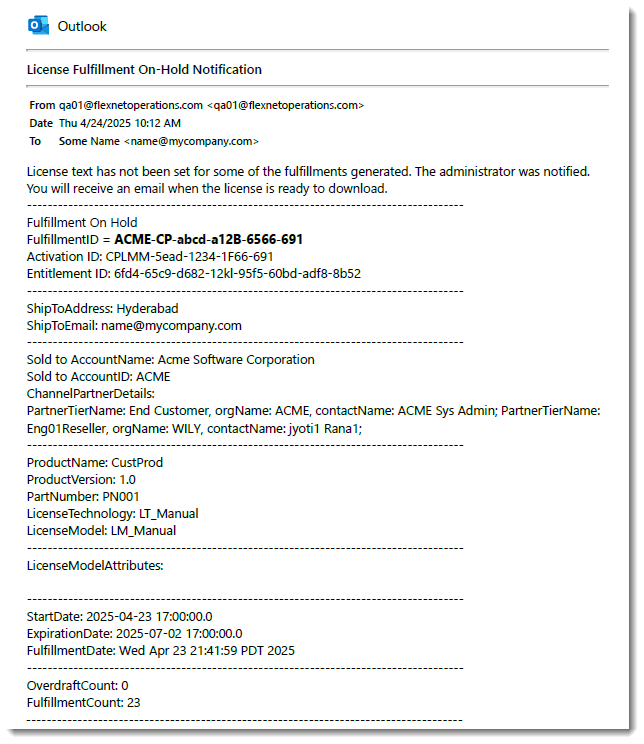
Example of an email with detailed fulfillment information, based on the Fulfillment On Hold template.
Advanced Search for Entitlements Includes Custom License Models
(Case 02987224, SWM-25152)
On the List Entitlements page, the Advanced Search now allows users to filter entitlements by custom license models. This enhancement is available in both the Producer Portal and the End-User Portal.
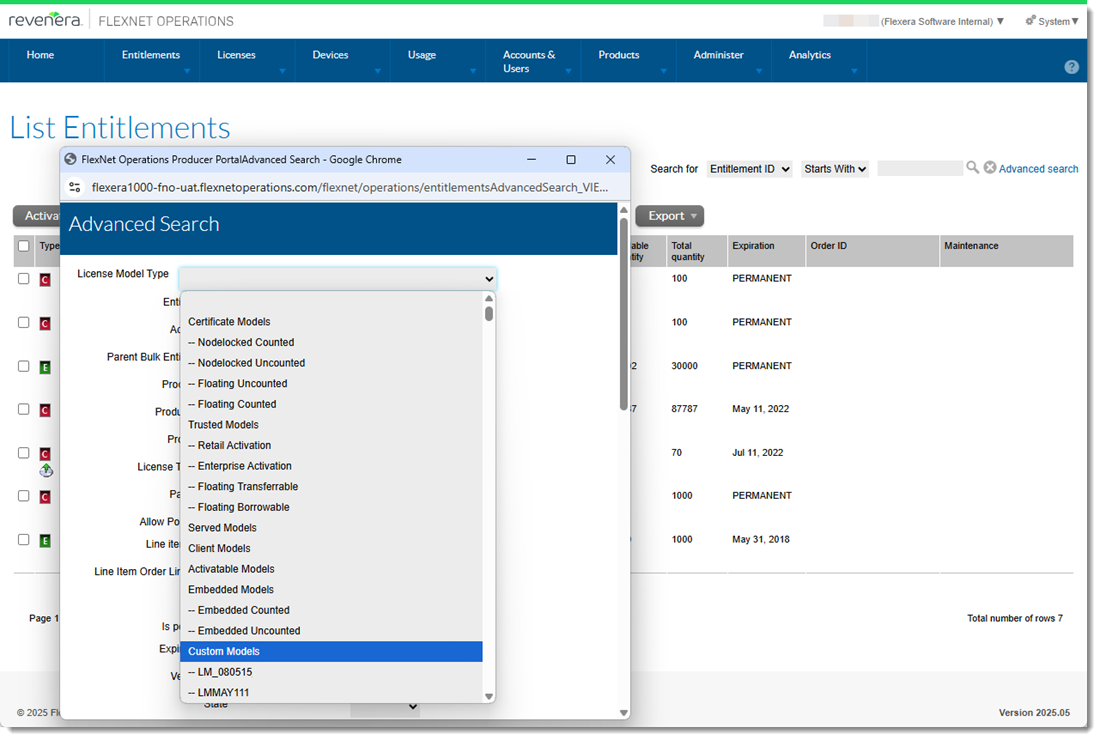
The Advanced Search window now includes custom license models when searching for entitlements.