InstallShield 2015 » Microsoft App-V Assistant
Edition: The Microsoft App-V Assistant is included in the Virtualization Pack.
You can use the Microsoft App-V Assistant to convert a Windows Installer package into an App-V package. During this process, you can perform the following tasks:
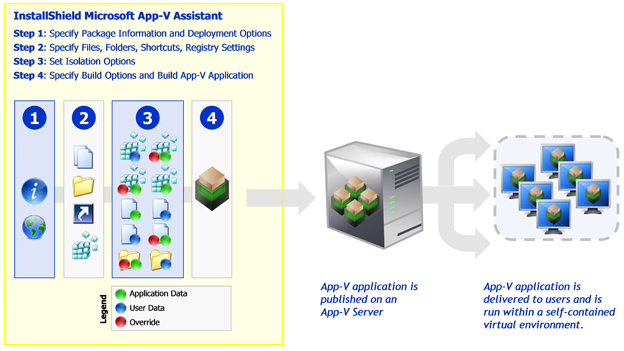
| • | Specify Package Information and Deployment Options—Specify the package name, root folder name, enter a comment, specify any operating system requirements, and identify the deployment server. |
| • | Specify Files, Folders, Shortcuts, Registry Settings—Specify the files, folders, application shortcuts, and registry settings that will be included in the App-V package. |
| • | Configure Isolation Options—Set the isolation options for selected files, folders, and registry keys. |
| • | Build—Specify build options and build an App-V package. |
The following diagram illustrates the creation process for an App-V package:
Creating an App-V Package
See Also
Components of an App-V Package
Using the Microsoft App-V Assistant to Create an App-V Package
InstallShield 2015 Help LibraryJune 2015 |
Copyright Information | Contact Us |