Viewing Reports Shared By Your Producer
Note:Access to Producer Shared Reports requires the View Reports permission.
Software producers can create reports in Producer Portal Analytics and make selected reports available to End-User Portal users. These reports appear under Analytics > Producer Shared Reports and can supplement the predefined Analytics Hub dashboards with reporting that is specific to the producer’s business relationship with its customers.
End-User Portal users can view shared reports but cannot create or modify report structures or layouts. Shared reports use the same report-viewing controls as other Analytics reports, including available view, bookmark, download, and subscription controls.
To view reports shared by your producer:
| 1. | Select Analytics > Producer Shared Reports. The Producer Shared Reports page opens. |
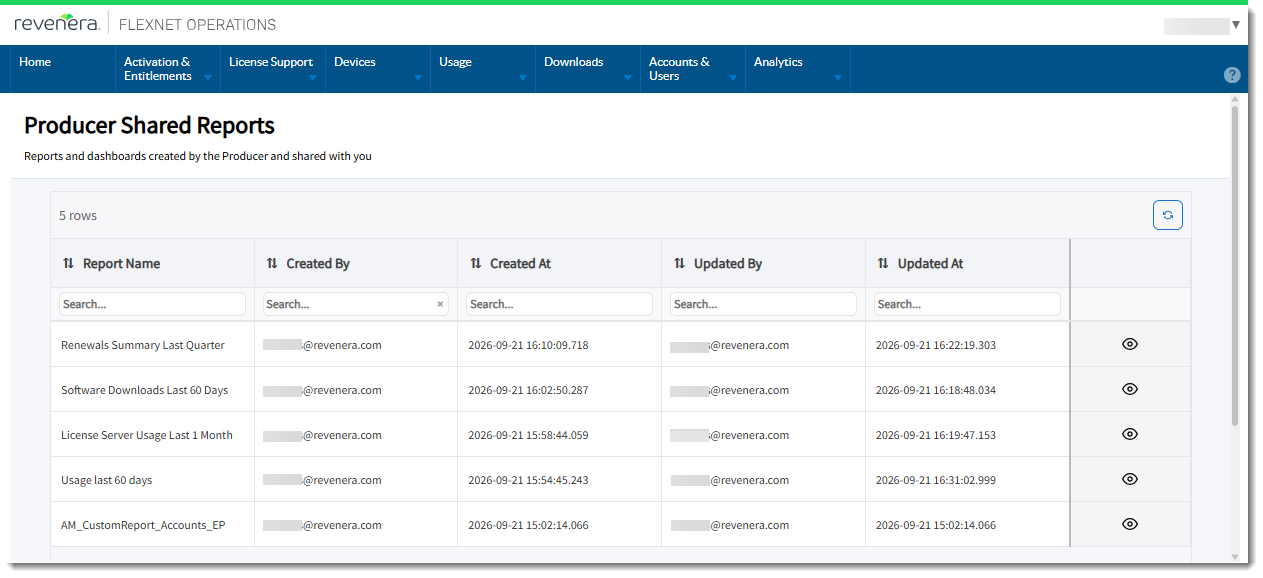
| 2. | Locate the report in the list. You can use the search fields in the column headings to narrow the results. |
| 3. | Click the View icon  for the report you want to view. for the report you want to view. |
Working with Shared Reports
After opening a shared report, you can use the available report controls to download report data, create subscriptions, save bookmarked views, and filter report data. For more information, see:
| • | Downloading and Managing Reports |
| • | Managing Subscriptions |
| • | Managing Bookmarked Views |
| • | Filtering Analytics Data |
Note:The available controls depend on the report and the permissions assigned to your role. Creating report subscriptions requires both the View Reports and Subscribe to Reports permissions.