Access Management
The SBOM Insights Administration module provides access management capabilities, enabling you to manage users, user groups, accounts, and roles across all SBOM Insights Organizations. Roles, groups, and accounts are scoped to an Organization, allowing greater control for performing management actions such as granting user roles.
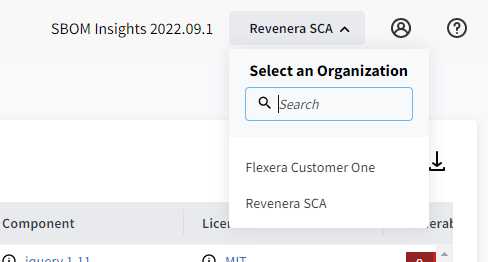
An Organization is a container for users, groups, and accounts. The name of the current Organization is displayed in the header information, to the left of the profile icon  in the top right corner. In the following example, Revenera SCA is the current Organization. Clicking the arrow to the right of the current Organization invokes a Select an Organization dropdown list of available Organizations, as well as a search box to filter Organizations for easier selection.
For more information SBOM Insight access management, refer to the following sections: