Configuring Remote Site Settings
To allow Salesforce to make calls to FlexNet Operations via the Salesforce Connector, you must register FlexNet Operations in Salesforce on the Remote Site Settings page as a remote site. Without registering FlexNet Operations first, any calls to or from FlexNet Operations will fail.
Note:You must have administrator rights in Salesforce to register a remote site.
To register FlexNet Operations as a remote site
| 1. | From Setup, enter Remote Site Settings in the Quick Find box, then select Remote Site Settings. |
The Remote Site Settings page displays a list of any remote sites already registered and provides additional information about each site, including remote site name and URL.
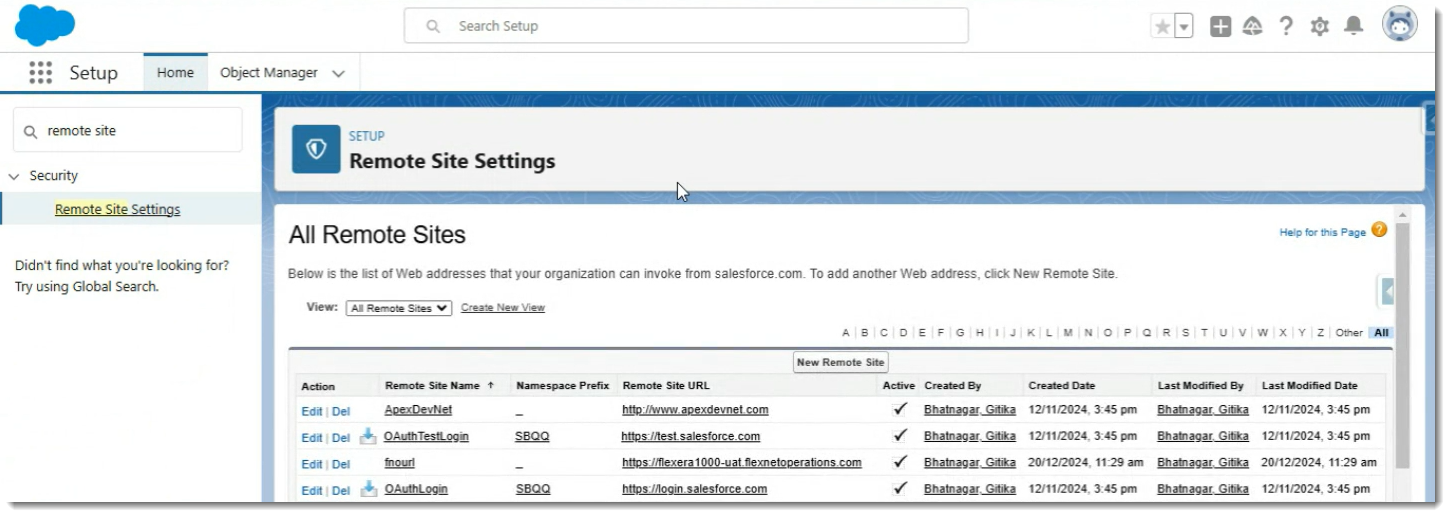
| 2. | Click New Remote Site, above the list of remote sites. |
| 3. | For Remote Site Name, enter a descriptive term, for example, FlexNet_Operations_UAT. |
Note:A valid remote site name must meet the following criteria:
| • | Contain only alphanumeric characters and underscores ( _ ). |
| • | Start with a letter. |
| • | Be unique. |
| • | Cannot include spaces. |
| • | Cannot end with an underscore ( _ ). |
| • | Cannot have two consecutive underscores ( __ ). |
| 4. | Enter the URL for your FlexNet Operations UAT deployment: |
https://<siteID>-uat.flexnetoperations.com
where <siteID> is your organization’s site ID which is supplied by Revenera. This is usually your organization's DNS name, but can also be the tenant ID that was assigned to your organization when FlexNet Operations was first implemented, and would have the format flexNNNN.
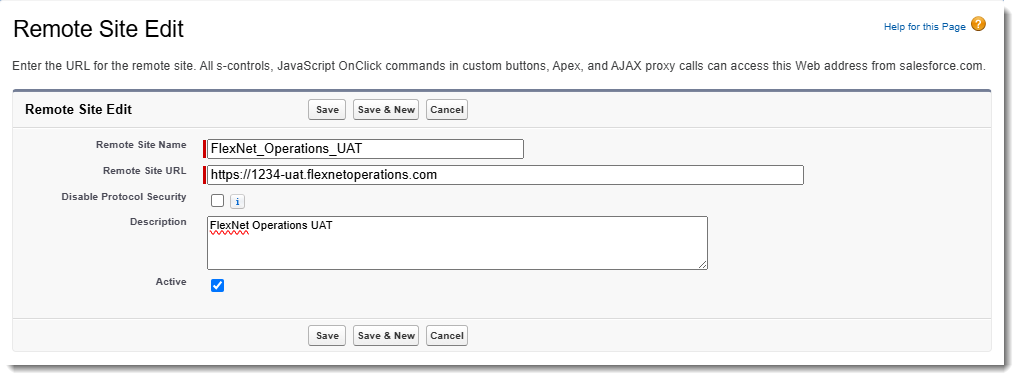
Example of a remote site for FlexNet Operations UAT.
Note:This step defines the URL for your UAT environment. Repeat the procedure for a production deployment, where you omit “-uat” in the URL.
Tip:Make a note of the URL you just entered. You will need it for the next step, Setting up the Connection Between the Salesforce Connector and FlexNet Operations.
| 5. | Leave the Disable Protocol Security checkbox unselected. |
| 6. | Optionally, enter a description of the site. |
| 7. | Click Save to finish. |
The Remote Site Settings page shows the details of the remote site that you set up.