Setting up the Connection Between the Salesforce Connector and FlexNet Operations
Note:You must have administrator rights in Salesforce to make changes on the Admin Settings tab in the Salesforce Connector.
Provide credentials of a FlexNet Operations user with System Administrator permissions to set up the connection between Salesforce and your FlexNet Operations tenant. This is a one-time operation. Once you have been authenticated, Salesforce will securely store your credentials.
You cannot perform any activity in the Salesforce Connector before you have successfully authenticated.
To set up the connection to FlexNet Operations
| 1. | In Salesforce, click the App Launcher in the top left corner and type FlexNet Operations Salesforce Connector, then select FlexNet Operations Salesforce Connector from the list of items. |
Salesforce will start the Salesforce Connector, with the Overview tab selected.
| 2. | In the navigation menu on the left, click Admin Settings. |
| 3. | Enter FlexNet Operations system administrator credentials to configure the connection to FlexNet Operations: |
| • | Username—Enter the user name. |
| • | Password—Enter the password. |
| • | FlexNet Operations URL—Enter the URL of your FlexNet Operations tenant. This is the same URL that you entered for the remote site settings (see Configuring Remote Site Settings). |
Example: https://<siteID>-uat.flexnetoperations.com
where <siteID> would would have the format flexNNNN. For production environments, omit “-uat”.
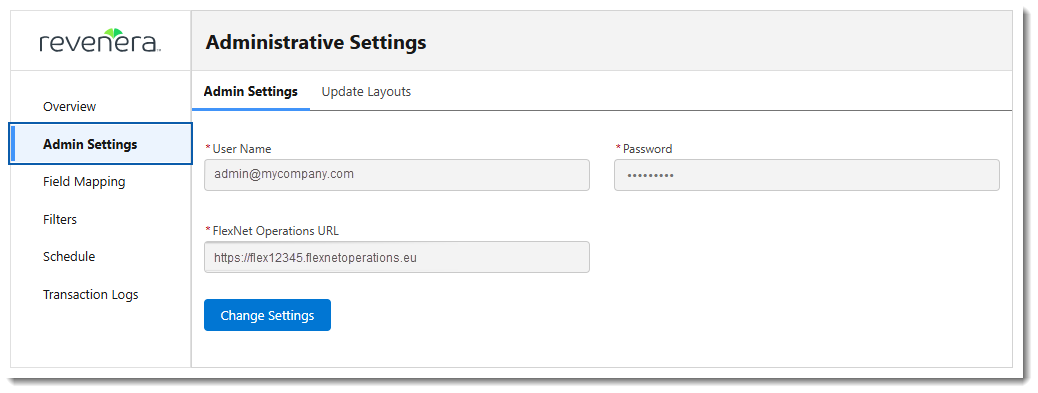
An example of the populated Admin Settings screen.
| 4. | Click Submit. |
A confirmation message is displayed, indicating that user credentials have been verified and saved.